ツール検索ツール
AI エージェントが Slack、GitHub、Jira、MCP サーバーなど、より多くのサービスに接続するにつれて、ツールライブラリは急速に拡大します。一般的なマルチサーバー構成では、会話が始まる前に 55,000+ トークンを使用するツールが 50 個以上集積される可能性があります。また、モデルが 30 個以上の類似した名前のツールに直面すると、ツールの選択精度が低下します。
ToolSearchToolCallingAdvisor は、デフォルトの ToolCallingAdvisor をプログレッシブツール開示パターンの実装に置き換えることでこの問題を解決します。ツール定義は、事前に送信されるのではなく、必要に応じて段階的にモデルに公開されます。OpenAI、Anthropic、Gemini のベンチマークでは、大規模なツールカタログへのアクセスを維持しながら 34 – 64% トークン削減が実現されています。測定方法と手法については、Smart Tool Selection blog post (英語) を参照してください。
このページは、アドバイザー、その ToolIndex 戦略、構成、Spring Boot 自動構成に関するリファレンスです。このアドバイザーがより広範なツール呼び出しアーキテクチャの中でどのような位置づけにあるかについては、Scaling to Hundreds of Tools を参照してください。
使い方
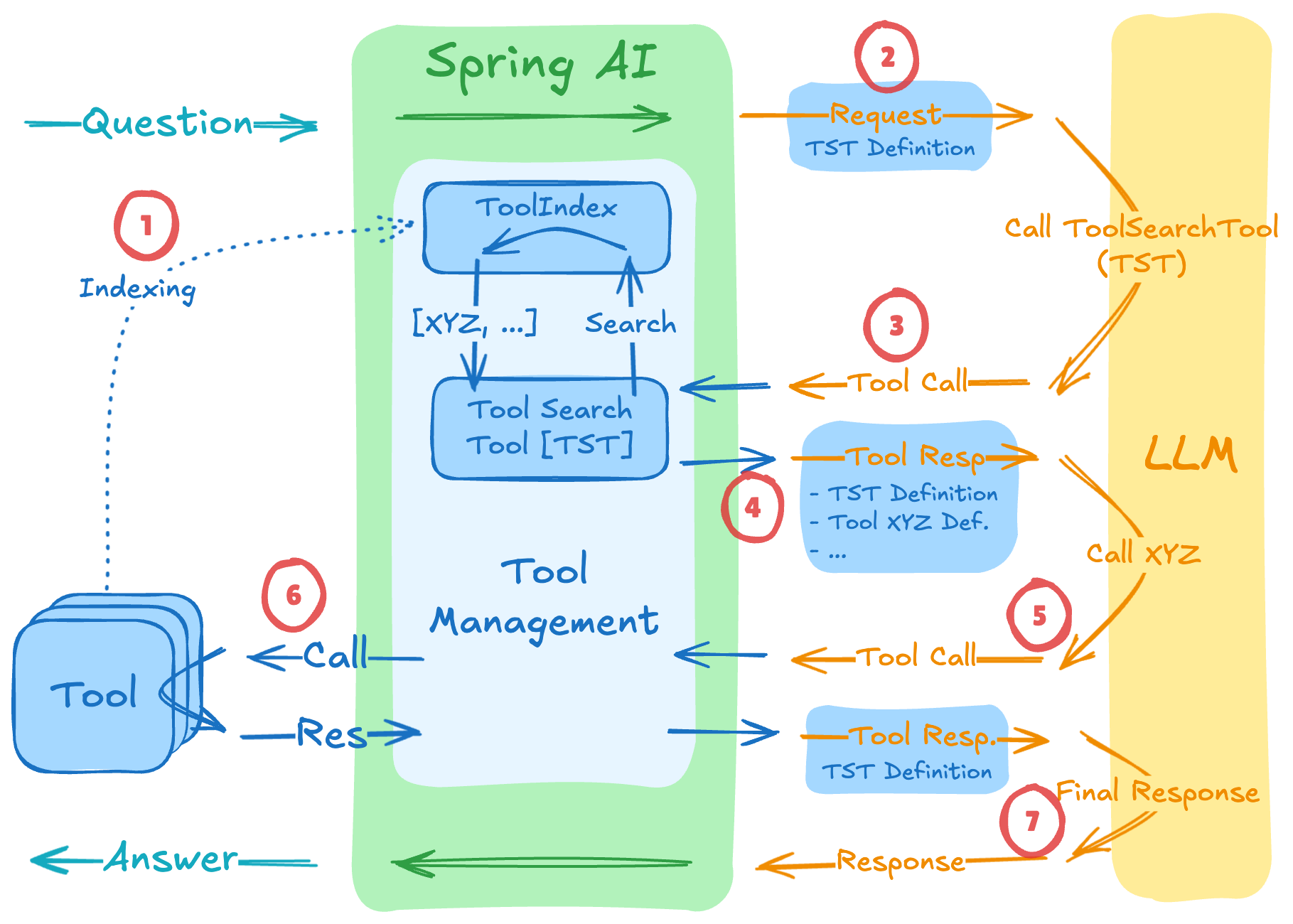
ToolSearchToolCallingAdvisor extends ToolCallingAdvisor and overrides the loop’s initialization and per-iteration hooks. The runtime flow:
インデックス作成 — at session start, all registered tools are indexed in the configured
ToolIndex. No tool definitions are sent to the model。Initial request — the first request to the LLM contains only the built-in
toolSearchTooldefinition.Discovery call — when the model needs a capability, it calls
toolSearchToolwith a natural-language query.Search & expand — the
ToolIndexfinds matching tools; their definitions are appended to the conversation for the next iteration.Tool invocation — the model, now equipped with the relevant definition, issues a normal tool call.
Tool execution —
ToolCallingManagerexecutes the discovered tool and returns its result.レスポンス — the model produces the final answer using the tool result.
The indexed tool set is scoped per session (see Session Scoping ); concurrent conversations have isolated indexes.
いつ使うか
ぴったり合う:
10+ tools registered with the
ChatClient.Tool definitions consuming more than 10K tokens per request.
Multi-server MCP setups where the aggregated tool catalog is large.
Symptoms of tool-selection accuracy issues with large tool sets.
Stick with the default ToolCallingAdvisor when:
Your tool library is small (under 10 tools).
すべてのツールは、各セッションで頻繁に使用されます。
Tool definitions are very compact (the search round-trips would outweigh the token savings).
インストール
最も簡単なセットアップには、Spring Boot スターターを使用してください(Lucene と自動構成が含まれています)。
または、ライブラリを直接使用して手動で設定することもできます。
Maven
Gradle
<dependency>
    <groupId>org.springframework.ai</groupId>
    <artifactId>spring-ai-tool-search-advisor</artifactId>
</dependency>
dependencies {
implementation 'org.springframework.ai:spring-ai-tool-search-advisor'
}クイックスタート
The fastest path is the auto-configuration — see Spring Boot 自動構成 below. For manual wiring:
// 1. Configure a ToolIndex (semantic, keyword, or regex)
@Bean
ToolIndex toolIndex(VectorStore vectorStore) {
    return new VectorToolIndex(vectorStore);
}

// 2. Build the advisor
var toolSearchAdvisor = ToolSearchToolCallingAdvisor.builder()
    .toolIndex(toolIndex)
    .maxResults(5)
    .build();

// 3. Register with ChatClient — tools are indexed but NOT sent to the LLM up front
ChatClient chatClient = ChatClient.builder(chatModel)
    .defaultTools(new MyTools())
    .defaultAdvisors(toolSearchAdvisor)
    .build();

// 4. Make a request — supply a session ID via the advisor context
String answer = chatClient.prompt("Help me plan what to wear today in Amsterdam")
    .advisors(a -> a.param(ChatMemory.CONVERSATION_ID, "user-42-session"))
    .call()
    .content();
Session Scoping
ToolSearchToolCallingAdvisor indexes tools per session. The session ID determines which tool index a request sees — this enables multi-tenant and multi-conversation isolation.
The caller must supply a session ID with every request. By default the advisor reads the session ID from the advisor context under the ChatMemory.CONVERSATION_ID key:
chatClient.prompt()
    .advisors(a -> a.param(ChatMemory.CONVERSATION_ID, "user-42-session"))
    .user("...")
    .call()
    .content();
If your application already passes a session identifier under a different key — for example tenantId or userId — change the lookup key via sessionIdKeyName(…) (or the corresponding property):
var advisor = ToolSearchToolCallingAdvisor.builder()
    .toolIndex(toolIndex)
    .sessionIdKeyName("tenantId")
    .build();
If memory advisors are configured with conversation IDs (the standard pattern with MessageChatMemoryAdvisor), the same key is already in the context — you get session scoping "for free" by virtue of the memory setup. |
検索戦略
ToolIndex インターフェースは検索の実装を抽象化します。標準で 3 つの検索戦略が提供されています。
| 戦略 | 実装 | 最適な用途 |
|---|---|---|
セマンティック |
| Natural-language queries, fuzzy matching, novel phrasings — when callers describe what they need rather than naming the tool |
キーワード |
| Exact-term matching, fast retrieval, known vocabulary |
正規表現 |
| Tool name patterns (e.g. |
VectorToolIndex (セマンティック)
Uses embedding-based similarity search. Best when callers describe what they need in natural language.
@Bean
ToolIndex vectorToolIndex(VectorStore vectorStore) {
    return new VectorToolIndex(vectorStore);
}
Requires a VectorStore bean (e.g. via spring-ai-starter-vector-store-pgvector). Tool name and description are embedded on indexing; queries from toolSearchTool are embedded and the top-K matches are returned.
LuceneToolIndex (キーワード)
Uses Apache Lucene for keyword-based search. Fast, no embedding model required.
@Bean
ToolIndex luceneToolIndex() {
    return new LuceneToolIndex();          // default minimum score 0.25
    // return new LuceneToolIndex(0.4f);   // custom minimum score threshold
}
Hits below the minimum score threshold are silently dropped. Raise the threshold to be more selective; lower it to be more permissive.
RegexToolIndex (パターン)
Uses regex pattern matching against tool names. Useful when tool names follow a strict naming convention (e.g. get_*, database). Zero additional dependencies.
@Bean
ToolIndex regexToolIndex() {
    return new RegexToolIndex();
}
The default index when no explicit tool-index-type is configured.
構成
ToolSearchToolCallingAdvisor.Builder extends ToolCallingAdvisor.Builder and adds search-specific options. See ToolCallingAdvisor Builder Options for inherited settings.
| オプション | 説明 | デフォルト |
|---|---|---|
| 使用する検索実装。 | 必須 |
| Maximum tool references returned per |
|
| Custom prompt suffix appended to the system message to instruct the model on how to use | 組み込みテンプレート ( |
| When |
|
| Advisor context key used to look up the conversation/session ID. |
|
| Determines when session tool indexes are freed. See インデックス退去。 |
|
ToolIndex API
The ToolIndex interface and its companion types (ToolSearchRequest、ToolSearchResponse、ToolReference) live in the spring-ai-tool-search-tool module under org.springframework.ai.tool.toolsearch. The built-in implementations (LuceneToolIndex、VectorToolIndex、RegexToolIndex) are also in this module.
<dependency>
    <groupId>org.springframework.ai</groupId>
    <artifactId>spring-ai-tool-search-tool</artifactId>
</dependency>
public interface ToolIndex {
void indexTool(String sessionId, ToolReference toolReference);
/** Default implementation loops over indexTool. */
void indexTools(String sessionId, List<ToolReference> toolReferences);
ToolSearchResponse search(ToolSearchRequest request);
void clearIndex(String sessionId);
}Every operation is scoped by sessionId. Implement ToolIndex directly when you need a custom search strategy — for example, a database-backed catalog with role-based filtering, or a cached remote tool registry.
インデックス退去
Per-session tool indexes consume memory. The ToolIndexEvictionStrategy decides when to free them.
By default (LruEvictionStrategy(1000)), up to 1,000 active sessions are retained and the least-recently-used session is evicted once the cap is exceeded. Call advisor.evictSession(sessionId) to release a session eagerly (e.g. on logout).
退去処理は各リクエストごとに遅延評価されます。バックグラウンドスレッドは必要ありません。
Five built-in strategies are provided:
| 戦略 | 振る舞い |
|---|---|
|
Evicts the least-recently-used session once the number of active sessions exceeds |
| 自動的に削除されることはありません。インデックスは、 |
| リクエストごとにセッションのインデックスをクリアし、毎回完全な再インデックスを強制します。テスト時や、ツールセットがリクエストごとに変更される場合に便利です。 |
| Evicts sessions whose last-access time exceeds the given TTL. |
| Delegates to multiple strategies; evicts a session if any delegate requests it. |
// Default: LRU cap of 1000 sessions — no configuration needed
var advisor = ToolSearchToolCallingAdvisor.builder()
    .toolIndex(toolIndex)
    .build();

// Never evict — manage session lifetime yourself
var advisor = ToolSearchToolCallingAdvisor.builder()
    .toolIndex(toolIndex)
    .evictionStrategy(NeverEvictStrategy.INSTANCE)
    .build();

// Always evict — re-index every request (useful for testing)
var advisor = ToolSearchToolCallingAdvisor.builder()
    .toolIndex(toolIndex)
    .evictionStrategy(AlwaysEvictStrategy.INSTANCE)
    .build();

// LRU with custom cap
var advisor = ToolSearchToolCallingAdvisor.builder()
    .toolIndex(toolIndex)
    .evictionStrategy(new LruEvictionStrategy(200))
    .build();

// Evict sessions idle for more than 30 minutes
var advisor = ToolSearchToolCallingAdvisor.builder()
    .toolIndex(toolIndex)
    .evictionStrategy(new TtlEvictionStrategy(Duration.ofMinutes(30)))
    .build();

// Combine: TTL + LRU cap
var advisor = ToolSearchToolCallingAdvisor.builder()
    .toolIndex(toolIndex)
    .evictionStrategy(new CompositeEvictionStrategy(
        new TtlEvictionStrategy(Duration.ofMinutes(30)),
        new LruEvictionStrategy(200)))
    .build();
Spring Boot 自動構成
spring-ai-starter-tool-search-advisor スターターは、定型的な設定を一切必要としません。以下のプロパティを 1 つ設定するだけで有効になります。
spring.ai.chat.client.tool-search-advisor.enabled=trueWhen enabled, the auto-configuration:
Registers a
ToolSearchToolCallingAdvisor.Builderbean typed asToolCallingAdvisor.Builder<?>. This transparently replaces the defaultToolCallingAdvisorthanks to the@ConditionalOnMissingBeanguard on the default builder — no code changes to yourChatClientare needed. See カスタム ToolAdvisor: Auto-Configuration Integration for the underlying mechanism.Auto-registers a
ToolIndexbean unless your application declares one explicitly.
ToolIndex Auto-Selection
spring.ai.chat.client.tool-search-advisor.tool-index-type を設定して実装を選択します。
| 値 | 実装 | 要件 |
|---|---|---|
|
| 追加の依存関係はありません |
|
|
|
|
| アプリケーションコンテキストにおける |
A custom ToolIndex bean declared by the application always takes precedence — @ConditionalOnMissingBean skips the auto-configured one.
構成プロパティリファレンス
| プロパティ | 説明 | デフォルト |
|---|---|---|
| アドバイザーを有効にします。 |
|
|
|
|
| 検索呼び出しごとに返されるツール参照の最大数。 |
|
| システムメッセージにカスタムプロンプトサフィックスが追加されます。 |
|
| When |
|
| 会話 / セッション ID を保持するアドバイザーコンテキストキー。 |
|
| このアドバイザーの位置は、アドバイザーチェーン内にあります。 |
|
| LRU(最下位更新)によるセッション削減戦略によって保持されるアクティブセッションの最大数。 |
|
| TTL for idle sessions. When set, a composite LRU+TTL strategy is used. Accepts a |
|
| ヒットがカウントされるための最低 Lucene スコア。 |
|
構成例
Lucene with custom threshold and TTL eviction:
spring.ai.chat.client.tool-search-advisor.enabled=true
spring.ai.chat.client.tool-search-advisor.tool-index-type=lucene
spring.ai.chat.client.tool-search-advisor.lucene.min-score-threshold=0.4
spring.ai.chat.client.tool-search-advisor.eviction.ttl=30m
Vector search (requires a VectorStore bean):
spring.ai.chat.client.tool-search-advisor.enabled=true
spring.ai.chat.client.tool-search-advisor.tool-index-type=vector
Custom session-ID key for a multi-tenant deployment:
spring.ai.chat.client.tool-search-advisor.enabled=true
spring.ai.chat.client.tool-search-advisor.tool-index-type=vector
spring.ai.chat.client.tool-search-advisor.session-id-key-name=tenantId
関連事項
ツール呼び出し: Scaling to Hundreds of Tools — conceptual overview
ToolCallingAdvisor — the base class and inherited builder options
スマートツールの選択: 34 – 64% Token Savings (英語) (Dec 2025) — benchmarks and methodology
Dynamic Tool Discovery guide — worked example

