このバージョンはまだ開発中であり、まだ安定しているとは見なされていません。最新の安定バージョンについては、Spring AI 1.1.7 を使用してください! |
チャットクライアント API
ChatClient は、AI モデルと通信するためのスムーズな API を提供します。同期プログラミングモデルとストリーミングプログラミングモデルの両方をサポートします。
|
Fluent API には、AI モデルに入力として渡されるプロンプトの構成要素を構築するためのメソッドがあります。Prompt には、AI モデルの出力と動作をガイドする指示テキストが含まれています。API の観点から見ると、プロンプトはメッセージのコレクションで構成されます。
AI モデルは、ユーザーからの直接入力であるユーザーメッセージと、会話をガイドするためにシステムによって生成されるシステムメッセージという 2 種類の主なメッセージを処理します。
これらのメッセージには、多くの場合、ユーザー入力に基づいて実行時に置換され、ユーザー入力に対する AI モデルのレスポンスをカスタマイズするプレースホルダーが含まれます。
使用する AI モデルの名前や、生成される出力のランダム性や創造性を制御する温度設定など、指定できるプロンプトオプションもあります。
ChatClient の作成
ChatClient は、ChatClient.Builder オブジェクトを使用して作成されます。任意の ChatModel Spring Boot 自動構成に対して自動構成された ChatClient.Builder インスタンスを取得するか、プログラムで作成することができます。
自動構成された ChatClient.Builder を使用する
最も単純な使用例では、Spring AI は Spring Boot の自動構成を提供し、クラスに挿入するためのプロトタイプ ChatClient.Builder Bean を作成します。以下は、単純なユーザーリクエストに対する String レスポンスを取得する簡単な例です。
@RestController
class MyController {

    private final ChatClient chatClient;

    public MyController(ChatClient.Builder chatClientBuilder) {
        this.chatClient = chatClientBuilder.build();
    }

    @GetMapping("/ai")
    String generation(String userInput) {
        return this.chatClient.prompt()
            .user(userInput)
            .call()
            .content();
    }
} この単純な例では、ユーザー入力によってユーザーメッセージの内容が設定されます。call() メソッドは AI モデルにリクエストを送信し、content() メソッドは AI モデルのレスポンスを String として返します。
複数のチャットモデルの操作
1 つのアプリケーションで複数のチャットモデルを操作する必要があるシナリオはいくつかあります。
異なる型のタスクに異なるモデルを使用する (たとえば、複雑な推論には強力なモデル、より単純なタスクにはより高速で安価なモデルなど)
1 つのモデルサービスが利用できない場合のフォールバックメカニズムの実装
異なるモデルや構成の A/B テスト
ユーザーの好みに応じてモデルの選択肢を提供する
特殊モデルを組み合わせる (1 つはコード生成用、もう 1 つはクリエイティブコンテンツ用などです。)
デフォルトでは、Spring AI は単一の ChatClient.Builder Bean を自動構成します。ただし、アプリケーションで複数のチャットモデルを扱う必要がある場合があります。その場合の対処方法を以下に示します。
単一モデル型で複数の ChatClients
このセクションでは、同じ基盤となるモデル型を使用しながら構成が異なる複数の ChatClient インスタンスを作成する必要がある一般的なユースケースについて説明します。自動構成された ChatClient.Builder はプロトタイプスコープであるため、各インジェクションポイントごとに新しいインスタンスが作成されます。
@Configuration
class ChatClientConfig {

    @Bean
    ChatClient defaultChatClient(ChatClient.Builder builder) {
        return builder.build();
    }

    @Bean
    ChatClient customChatClient(ChatClient.Builder builder) {
        return builder.defaultSystem("You are a helpful assistant.").build();
    }
}
さまざまなモデル型の ChatClients
複数の AI モデルを扱う場合、ChatClient.create(chatModel) や ChatClient.builder(chatModel) を使用して個別の ChatClient Bean を定義したくなるかもしれません。しかし、そうすると自動構成された ChatClient.Builder がバイパスされ、オブザーバビリティと ChatClientBuilderCustomizer Bean が無視されてしまいます。
可観測性とカスタマイザーを維持するには、ChatClientBuilderConfigurer を注入してカスタムビルダーを作成する必要があります。ChatClientBuilderConfigurer は、登録されているすべての ChatClientBuilderCustomizer Bean を適用し、可観測性を接続します。これは、自動構成が内部的に行う処理を反映したものです。
アプリケーションコンテキストに複数の ChatModel Bean が存在する場合、Spring は自動構成された ChatClient.Builder Bean の ChatModel 依存関係を曖昧さなく解決できません。これを解決するには、いずれかの ChatClient Bean を @Primary としてマークします。また、手動で定義している場合は、いずれかの ChatModel Bean を @Primary としてマークする必要があるかもしれません。あるいは、自動構成された ChatClient.Builder Bean をオーバーライドするために、独自の ChatClient.Builder Bean を定義することもできます。
import io.micrometer.observation.ObservationRegistry;
import org.springframework.ai.anthropic.AnthropicChatModel;
import org.springframework.ai.chat.client.ChatClient;
import org.springframework.ai.chat.client.advisor.ToolCallingAdvisor;
import org.springframework.ai.chat.client.advisor.observation.AdvisorObservationConvention;
import org.springframework.ai.chat.client.observation.ChatClientObservationConvention;
import org.springframework.ai.chat.model.ChatModel;
import org.springframework.ai.model.chat.client.autoconfigure.ChatClientBuilderConfigurer;
import org.springframework.ai.openai.OpenAiChatModel;
import org.springframework.beans.factory.ObjectProvider;
import org.springframework.context.annotation.Bean;
import org.springframework.context.annotation.Configuration;
import org.springframework.context.annotation.Primary;

@Configuration
public class ChatClientConfig {

    @Bean
    @Primary
    public ChatClient openAiChatClient(OpenAiChatModel chatModel, ChatClientBuilderConfigurer configurer,
            ObjectProvider<ObservationRegistry> observationRegistry,
            ObjectProvider<ChatClientObservationConvention> chatClientObservationConvention,
            ObjectProvider<AdvisorObservationConvention> advisorObservationConvention,
            ObjectProvider<ToolCallingAdvisor.Builder<?>> toolCallingAdvisorBuilder) {
        return buildChatClient(chatModel, configurer, observationRegistry,
                chatClientObservationConvention, advisorObservationConvention, toolCallingAdvisorBuilder);
    }

    @Bean
    public ChatClient anthropicChatClient(AnthropicChatModel chatModel, ChatClientBuilderConfigurer configurer,
            ObjectProvider<ObservationRegistry> observationRegistry,
            ObjectProvider<ChatClientObservationConvention> chatClientObservationConvention,
            ObjectProvider<AdvisorObservationConvention> advisorObservationConvention,
            ObjectProvider<ToolCallingAdvisor.Builder<?>> toolCallingAdvisorBuilder) {
        return buildChatClient(chatModel, configurer, observationRegistry,
                chatClientObservationConvention, advisorObservationConvention, toolCallingAdvisorBuilder);
    }

    private ChatClient buildChatClient(ChatModel chatModel, ChatClientBuilderConfigurer configurer,
            ObjectProvider<ObservationRegistry> observationRegistry,
            ObjectProvider<ChatClientObservationConvention> chatClientObservationConvention,
            ObjectProvider<AdvisorObservationConvention> advisorObservationConvention,
            ObjectProvider<ToolCallingAdvisor.Builder<?>> toolCallingAdvisorBuilder) {
        ChatClient.Builder builder = ChatClient.builder(chatModel,
                observationRegistry.getIfUnique(() -> ObservationRegistry.NOOP),
                chatClientObservationConvention.getIfUnique(),
                advisorObservationConvention.getIfUnique(),
                toolCallingAdvisorBuilder.getIfAvailable());
        return configurer.configure(builder).build();
    }
} 次に、@Qualifier アノテーションを使用してこれらの Bean をアプリケーションコンポーネントに挿入できます。
@Configuration
public class ChatClientExample {

    @Bean
    CommandLineRunner cli(
            @Qualifier("openAiChatClient") ChatClient openAiChatClient,
            @Qualifier("anthropicChatClient") ChatClient anthropicChatClient) {

        return args -> {
            var scanner = new Scanner(System.in);
            ChatClient chat;

            // Model selection
            System.out.println("\nSelect your AI model:");
            System.out.println("1. OpenAI");
            System.out.println("2. Anthropic");
            System.out.print("Enter your choice (1 or 2): ");

            String choice = scanner.nextLine().trim();

            if (choice.equals("1")) {
                chat = openAiChatClient;
                System.out.println("Using OpenAI model");
            } else {
                chat = anthropicChatClient;
                System.out.println("Using Anthropic model");
            }

            // Use the selected chat client
            System.out.print("\nEnter your question: ");
            String input = scanner.nextLine();
            String response = chat.prompt(input).call().content();
            System.out.println("ASSISTANT: " + response);

            scanner.close();
        };
    }
}
複数の OpenAI 互換 API エンドポイント
OpenAiChatModel のビルダーを使用すれば、複数のインスタンスを作成して、さまざまな OpenAI 互換 API に接続できます。これは、複数のプロバイダーと連携する必要がある場合に特に便利です。
@Service
public class MultiModelService {

    private static final Logger logger = LoggerFactory.getLogger(MultiModelService.class);

    public void multiClientFlow() {
        try {
            // Create a new OpenAiChatModel for Groq (Llama3)
            OpenAiChatModel groqModel = OpenAiChatModel.builder()
                .options(OpenAiChatOptions.builder()
                    .baseUrl("https://api.groq.com/openai/v1")
                    .apiKey(System.getenv("GROQ_API_KEY"))
                    .model("llama3-70b-8192")
                    .temperature(0.5)
                    .build())
                .build();

            // Create a new OpenAiChatModel for GPT-4
            OpenAiChatModel gpt4Model = OpenAiChatModel.builder()
                .options(OpenAiChatOptions.builder()
                    .baseUrl("https://api.openai.com")
                    .apiKey(System.getenv("OPENAI_API_KEY"))
                    .model("gpt-4")
                    .temperature(0.7)
                    .build())
                .build();

            // Simple prompt for both models
            String prompt = "What is the capital of France?";

            String groqResponse = ChatClient.builder(groqModel).build().prompt(prompt).call().content();
            String gpt4Response = ChatClient.builder(gpt4Model).build().prompt(prompt).call().content();

            logger.info("Groq (Llama3) response: {}", groqResponse);
            logger.info("OpenAI GPT-4 response: {}", gpt4Response);
        }
        catch (Exception e) {
            logger.error("Error in multi-client flow", e);
        }
    }
}
ChatClient 流れるような API
ChatClient Fluent API を使用すると、オーバーロードされた prompt メソッドを使用して Fluent API を開始し、3 つの異なる方法でプロンプトを作成できます。
prompt(): 引数のないこのメソッドを使用すると、Fluent API の使用を開始して、プロンプトのユーザー、システム、その他の部分を構築できます。prompt(Prompt prompt): このメソッドはPrompt引数を受け入れ、Prompt の非 Fluent API を使用して作成したPromptインスタンスを渡すことができます。prompt(String content): これは、前のオーバーロードに似た便利なメソッドです。ユーザーのテキストコンテンツを取得します。
ChatClient のレスポンス
ChatClient API は、Fluent API を使用して AI モデルからのレスポンスをフォーマットするいくつかの方法を提供します。
ChatResponse の返却
AI モデルからのレスポンスは、型 ChatResponse で定義されるリッチ構造です。レスポンスの生成方法に関するメタデータが含まれており、それぞれ独自のメタデータを持つ複数のレスポンス ( 世代と呼ばれる) を含めることもできます。メタデータには、レスポンスの作成に使用されたトークンの数 (各トークンは 1 ワードの約 3/4 です) が含まれます。ホスト型 AI モデルは、リクエストごとに使用されるトークンの数に基づいて課金されるため、この情報は重要です。
call() メソッドの後に chatResponse() を呼び出して、メタデータを含む ChatResponse オブジェクトを返す例を以下に示します。
ChatResponse chatResponse = chatClient.prompt()
    .user("Tell me a joke")
    .call()
    .chatResponse();
エンティティを返す
返された String からマップされたエンティティクラスを返す必要がある場合がよくあります。entity() メソッドはこの機能を提供します。
例: Java レコードが与えられた場合:
record ActorFilms(String actor, List<String> movies) {} 以下に示すように、entity() メソッドを使用して AI モデルの出力をこのレコードに簡単にマッピングできます。
ActorFilms actorFilms = chatClient.prompt()
    .user("Generate the filmography for a random actor.")
    .call()
    .entity(ActorFilms.class);
また、シグネチャー entity(ParameterizedTypeReference<T> type) を持つオーバーロードされた entity メソッドもあり、これを使用すると、ジェネリクスリストなどの型を指定できます。
List<ActorFilms> actorFilms = chatClient.prompt()
    .user("Generate the filmography of 5 movies for Tom Hanks and Bill Murray.")
    .call()
    .entity(new ParameterizedTypeReference<List<ActorFilms>>() {});
EntityParamSpec
3 つの entity() オーバーロードはすべて、2 つの独立した動作を可能にするオプションの Consumer<EntityParamSpec> を受け入れます。
プロバイダーネイティブ構造化出力
By default, the JSON schema is appended to the user message as text instructions. When useProviderStructuredOutput() is set, the schema is instead passed directly to the AI provider API as a structured constraint (equivalent to setting AdvisorParams.ENABLE_NATIVE_STRUCTURED_OUTPUT). This requires the underlying model to support StructuredOutputChatOptions.
ActorFilms actorFilms = chatClient.prompt()
    .user("Generate the filmography for a random actor.")
    .call()
.entity(ActorFilms.class, spec -> spec.useProviderStructuredOutput());| OpenAI などの一部の AI モデルは、オブジェクトの配列をネイティブにサポートしていません。そのような場合は、Spring AI のデフォルトの構造化出力変換を使用できます。 |
You can still set this globally for all calls via the advisor parameter:
ActorFilms actorFilms = chatClient.prompt()
    .advisors(AdvisorParams.ENABLE_NATIVE_STRUCTURED_OUTPUT)
    .user("Generate the filmography for a random actor.")
    .call()
    .entity(ActorFilms.class);
Schema Validation with Retry
schemaValidation() validates the model’s JSON response against the entity schema before returning it. If validation fails, the error message is appended to the user prompt and the model is retried, up to maxRepeatAttempts times (default: 3). This uses StructuredOutputValidationAdvisor internally.
ActorFilms actorFilms = chatClient.prompt()
    .user("Generate the filmography for a random actor.")
    .call()
    .entity(ActorFilms.class, spec -> spec.schemaValidation());
Both options can be combined:
ActorFilms actorFilms = chatClient.prompt()
    .user("Generate the filmography for a random actor.")
    .call()
    .entity(ActorFilms.class, spec -> spec
        .useProviderStructuredOutput()
        .validateSchema());
Streaming is not supported when validateSchema() is active. |
ストリーミングレスポンス
stream() メソッドを使用すると、次に示すように非同期レスポンスを取得できます。
Flux<String> output = chatClient.prompt()
    .user("Tell me a joke")
    .stream()
    .content();
Flux<ChatResponse> chatResponse() メソッドを使用して ChatResponse をストリーミングすることもできます。
将来的には、リアクティブ stream() メソッドを使用して Java エンティティを返す便利なメソッドを提供する予定です。それまでは、集約されたレスポンスを明示的に変換するには、以下に示すように構造化出力コンバーターを使用してください。これは、Fluent API におけるパラメーターの使用メソッドも示しており、これについてはドキュメントの後のセクションで詳しく説明します。
var converter = new BeanOutputConverter<>(new ParameterizedTypeReference<List<ActorsFilms>>() {});

Flux<String> flux = this.chatClient.prompt()
    .user(u -> u.text("""
                        Generate the filmography for a random actor.
                        {format}
                      """)
            .param("format", this.converter.getFormat()))
    .stream()
    .content();

String content = this.flux.collectList().block().stream().collect(Collectors.joining());

List<ActorsFilms> actorFilms = this.converter.convert(this.content);
プロンプトテンプレート
ChatClient 流暢 API を使用すると、実行時に置き換えられる変数を含むテンプレートとしてユーザーテキストとシステムテキストを提供できます。
String answer = ChatClient.create(chatModel).prompt()
    .user(u -> u
            .text("Tell me the names of 5 movies whose soundtrack was composed by {composer}")
            .param("composer", "John Williams"))
    .call()
    .content();
ChatClient は内部的に PromptTemplate クラスを使用してユーザーテキストとシステムテキストを処理し、指定された TemplateRenderer 実装に基づいて実行時に提供される値で変数を置き換えます。デフォルトでは、Spring AI は Terence Parr が開発したオープンソースの StringTemplate (英語) エンジンをベースにした StTemplateRenderer 実装を使用します。
Spring AI は、テンプレート処理が不要な場合のために NoOpTemplateRenderer も提供します。
ChatClient (.templateRenderer() 経由)に直接設定された TemplateRenderer は、ChatClient ビルダーチェーン(例: .user()、.system() 経由)で直接定義されたプロンプトコンテンツにのみ適用されます。これは、QuestionAnswerAdvisor など、アドバイザーが内部的に使用するテンプレートには影響しません。これらのテンプレートには独自のテンプレートカスタマイズメカニズムがあります(カスタムアドバイザーテンプレートを参照)。 |
別のテンプレートエンジンをご利用になりたい場合は、TemplateRenderer インターフェースのカスタム実装を ChatClient に直接提供できます。また、デフォルトの StTemplateRenderer をカスタム設定で使い続けることもできます。
例: デフォルトでは、テンプレート変数は {} 構文で識別されます。プロンプトに JSON を含める予定の場合は、JSON 構文との競合を避けるため、別の構文を使用することをお勧めします。例: < および > 区切り文字を使用できます。
String answer = ChatClient.create(chatModel).prompt()
    .user(u -> u
            .text("Tell me the names of 5 movies whose soundtrack was composed by <composer>")
            .param("composer", "John Williams"))
    .templateRenderer(StTemplateRenderer.builder().startDelimiterToken('<').endDelimiterToken('>').build())
    .call()
    .content();
call() の戻り値
ChatClient で call() メソッドを指定した後、レスポンス型にはいくつかの異なるオプションがあります。
String content(): レスポンスの文字列コンテンツを返しますChatResponse chatResponse(): 複数の世代と、レスポンスの作成に使用されたトークンの数など、レスポンスに関するメタデータを含むChatResponseオブジェクトを返します。ChatClientResponse chatClientResponse():ChatResponseオブジェクトと ChatClient 実行コンテキストを含むChatClientResponseオブジェクトを返します。これにより、アドバイザーの実行中に使用される追加データ (RAG フローで取得された関連ドキュメントなど) にアクセスできるようになります。entity()は Java 型を返すentity(ParameterizedTypeReference<T> type): エンティティ型のCollectionを返すために使用されます。entity(Class<T> type): 特定のエンティティ型を返すために使用されます。entity(StructuredOutputConverter<T> structuredOutputConverter):Stringをエンティティ型に変換するためにStructuredOutputConverterのインスタンスを指定するために使用されます。entity(ParameterizedTypeReference<T> type, Consumer<EntityParamSpec> spec): like above, with optional EntityParamSpec configuration.entity(Class<T> type, Consumer<EntityParamSpec> spec): like above, with optional EntityParamSpec configuration.entity(StructuredOutputConverter<T> converter, Consumer<EntityParamSpec> spec): like above, with optional EntityParamSpec configuration.
responseEntity()は、ChatResponseと Java 型の両方を返します。これは、AI モデルの完全なレスポンス(メタデータと世代を含む)と構造化された出力エンティティの両方に 1 回の呼び出しでアクセスする必要がある場合に便利です。responseEntity(Class<T> type): 完全なChatResponseオブジェクトと特定のエンティティ型の両方を含むResponseEntityを返すために使用されます。responseEntity(ParameterizedTypeReference<T> type): 完全なChatResponseオブジェクトとエンティティ型のCollectionの両方を含むResponseEntityを返すために使用されます。responseEntity(StructuredOutputConverter<T> structuredOutputConverter): 完全なChatResponseオブジェクトと、指定されたStructuredOutputConverterを使用して変換されたエンティティの両方を含むResponseEntityを返すために使用されます。
call() の代わりに stream() メソッドを呼び出すこともできます。
call() メソッドの呼び出しは、実際には AI モデルの実行をトリガーしません。Spring AI に対して、同期呼び出しとストリーミング呼び出しのどちらを使用するかを指示するだけです。実際の AI モデルの呼び出しは、content()、chatResponse()、responseEntity() などのメソッドが呼び出されたときに行われます。 |
stream() の戻り値
ChatClient で stream() メソッドを指定した後、レスポンス型にはいくつかのオプションがあります。
Flux<String> content(): AI モデルによって生成される文字列のFluxを返します。Flux<ChatResponse> chatResponse(): レスポンスに関する追加のメタデータを含むChatResponseオブジェクトのFluxを返します。Flux<ChatClientResponse> chatClientResponse():ChatResponseオブジェクトと ChatClient 実行コンテキストを含むChatClientResponseオブジェクトのFluxを返します。これにより、アドバイザーの実行中に使用される追加データ (RAG フローで取得された関連ドキュメントなど) にアクセスできるようになります。
メッセージメタデータ
ChatClient は、ユーザーメッセージとシステムメッセージの両方にメタデータを追加できます。メタデータは、AI モデルや下流処理で使用できるメッセージに関する追加のコンテキストと情報を提供します。
ユーザーメッセージへのメタデータの追加
metadata() メソッドを使用して、ユーザーメッセージにメタデータを追加できます。
// Adding individual metadata key-value pairs
String response = chatClient.prompt()
    .user(u -> u.text("What's the weather like?")
        .metadata("messageId", "msg-123")
        .metadata("userId", "user-456")
        .metadata("priority", "high"))
    .call()
    .content();

// Adding multiple metadata entries at once
Map<String, Object> userMetadata = Map.of(
    "messageId", "msg-123",
    "userId", "user-456",
    "timestamp", System.currentTimeMillis()
);

String response = chatClient.prompt()
    .user(u -> u.text("What's the weather like?")
        .metadata(userMetadata))
    .call()
    .content();
システムメッセージへのメタデータの追加
同様に、システムメッセージにメタデータを追加することもできます。
// Adding metadata to system messages
String response = chatClient.prompt()
    .system(s -> s.text("You are a helpful assistant.")
        .metadata("version", "1.0")
        .metadata("model", "gpt-4"))
    .user("Tell me a joke")
    .call()
    .content();
デフォルトのメタデータのサポート
ChatClient ビルダーレベルでデフォルトのメタデータを構成することもできます。
@Configuration
class Config {
    @Bean
    ChatClient chatClient(ChatClient.Builder builder) {
        return builder
            .defaultSystem(s -> s.text("You are a helpful assistant")
                .metadata("assistantType", "general")
                .metadata("version", "1.0"))
            .defaultUser(u -> u.text("Default user context")
                .metadata("sessionId", "default-session"))
            .build();
    }
}
メタデータ検証
ChatClient はメタデータを検証してデータの整合性を確保します。
メタデータキーは null または空にできません
メタデータ値は null にできません
マップを渡す場合、キーも値も null 要素を含むことはできません。
// This will throw an IllegalArgumentException
chatClient.prompt()
    .user(u -> u.text("Hello")
        .metadata(null, "value"))  // Invalid: null key
    .call()
    .content();

// This will also throw an IllegalArgumentException
chatClient.prompt()
    .user(u -> u.text("Hello")
        .metadata("key", null))    // Invalid: null value
    .call()
.content();デフォルトの使用
@Configuration クラスでデフォルトのシステムテキストを使用して ChatClient を作成すると、ランタイムコードが簡素化されます。デフォルトを設定すると、ChatClient を呼び出すときにユーザーテキストを指定するだけで済み、ランタイムコードパスで各リクエストに対してシステムテキストを設定する必要がなくなります。
デフォルトのシステムテキスト
次の例では、常に海賊の声で応答するようにシステムテキストを構成します。ランタイムコードでシステムテキストが繰り返されないようにするには、@Configuration クラスに ChatClient インスタンスを作成します。
@Configuration
class Config {

    @Bean
    ChatClient chatClient(ChatClient.Builder builder) {
        return builder.defaultSystem("You are a friendly chat bot that answers question in the voice of a Pirate")
                .build();
    }

}
そしてそれを呼び出すための @RestController です:
@RestController
class AIController {

	private final ChatClient chatClient;

	AIController(ChatClient chatClient) {
		this.chatClient = chatClient;
	}

	@GetMapping("/ai/simple")
	public Map<String, String> completion(@RequestParam(value = "message", defaultValue = "Tell me a joke") String message) {
		return Map.of("completion", this.chatClient.prompt().user(message).call().content());
	}
}
curl 経由でアプリケーションエンドポイントを呼び出すと、結果は次のようになります。
❯ curl localhost:8080/ai/simple
{"completion":"Why did the pirate go to the comedy club? To hear some arrr-rated jokes! Arrr, matey!"}
パラメーター付きのデフォルトのシステムテキスト
次の例では、システムテキスト内のプレースホルダーを使用して、設計時ではなく実行時に補完の音声を指定します。
@Configuration
class Config {

    @Bean
    ChatClient chatClient(ChatClient.Builder builder) {
        return builder.defaultSystem("You are a friendly chat bot that answers question in the voice of a {voice}")
                .build();
    }

}
@RestController
class AIController {
private final ChatClient chatClient;
AIController(ChatClient chatClient) {
this.chatClient = chatClient;
}
@GetMapping("/ai")
Map<String, String> completion(@RequestParam(value = "message", defaultValue = "Tell me a joke") String message, String voice) {
return Map.of("completion",
this.chatClient.prompt()
.system(sp -> sp.param("voice", voice))
.user(message)
.call()
.content());
}
}httpie 経由でアプリケーションエンドポイントを呼び出すと、結果は次のようになります。
http localhost:8080/ai voice=='Robert DeNiro'
{
    "completion": "You talkin' to me? Okay, here's a joke for ya: Why couldn't the bicycle stand up by itself? Because it was two tired! Classic, right?"
}
その他のデフォルト
ChatClient.Builder レベルでは、デフォルトのプロンプト構成を指定できます。
defaultOptions(ChatOptions chatOptions):ChatOptionsクラスで定義されたポータブルオプション、またはOpenAiChatOptionsなどのモデル固有のオプションを渡します。モデル固有のChatOptions実装の詳細については、JavaDocs を参照してください。defaultFunction(String name, String description, java.util.function.Function<I, O> function):nameは、ユーザーテキスト内の関数を参照するために使用されます。descriptionは関数の目的を説明し、AI モデルが正確なレスポンスのために正しい関数を選択できます。function引数は、必要に応じてモデルが実行する Java 関数インスタンスです。defaultFunctions(String… functionNames): アプリケーションコンテキストで定義された `java.util.Function` の Bean 名。defaultUser(String text)、defaultUser(Resource text)、defaultUser(Consumer<UserSpec> userSpecConsumer): これらのメソッドを使用すると、ユーザーテキストを定義できます。Consumer<UserSpec>では、ラムダを使用してユーザーテキストと既定のパラメーターを指定できます。defaultAdvisors(Advisor… advisor): アドバイザーを使用すると、Promptの作成に使用されるデータを変更することができます。QuestionAnswerAdvisor実装では、プロンプトにユーザーテキストに関連するコンテキスト情報を追加することで、Retrieval Augmented Generationのパターンが有効になります。defaultAdvisors(Consumer<AdvisorSpec> advisorSpecConsumer): このメソッドを使用すると、AdvisorSpecを使用して複数のアドバイザーを構成するためのConsumerを定義できます。アドバイザーは、最終的なPromptを作成するために使用されるデータを変更できます。Consumer<AdvisorSpec>を使用すると、ユーザーテキストに基づいて関連するコンテキスト情報をプロンプトに追加することでRetrieval Augmented GenerationをサポートするQuestionAnswerAdvisorなどのアドバイザーを追加するラムダを指定できます。
実行時に、default プレフィックスなしの対応するメソッドを使用して、これらのデフォルトをオーバーライドできます。
options(ChatOptions.Builder optionsCustomizer)function(String name, String description, java.util.function.Function<I, O> function)functions(String… functionNames)user(String text)、user(Resource text)、user(Consumer<UserSpec> userSpecConsumer)advisors(Advisor… advisor)advisors(Consumer<AdvisorSpec> advisorSpecConsumer)
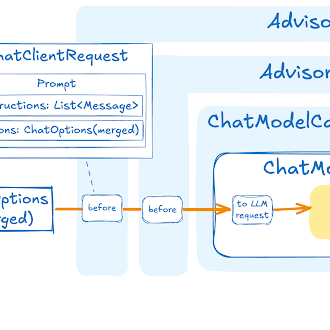
アドバイザー
アドバイザー API は、Spring アプリケーションで AI 駆動型のインタラクションをインターセプト、変更、強化するための柔軟かつ強力な方法を提供します。
ユーザーテキストを使用して AI モデルを呼び出す場合の一般的なパターンは、プロンプトにコンテキストデータを追加または拡張することです。
このコンテキストデータにはさまざまな種類があります。一般的な種類は次のとおりです。
あなた自身のデータ : これは、AI モデルがトレーニングされていないデータです。モデルが同様のデータを見たことがある場合でも、レスポンスの生成では追加されたコンテキストデータが優先されます。
会話履歴 : チャットモデルの API はステートレスです。AI モデルに名前を伝えても、その後のやり取りではその名前は記憶されません。レスポンスを生成する際に以前のやり取りが考慮されるようにするには、各リクエストで会話履歴を送信する必要があります。
ChatClient のアドバイザー構成
ChatClient Fluent API は、アドバイザーを構成するための AdvisorSpec インターフェースを提供します。このインターフェースは、パラメーターを追加したり、複数のパラメーターを一度に設定したり、1 つ以上のアドバイザーを チェーンに追加したりするためのメソッドを提供します。
interface AdvisorSpec {
    AdvisorSpec param(String k, Object v);
    AdvisorSpec params(Map<String, Object> p);
    AdvisorSpec advisors(Advisor... advisors);
    AdvisorSpec advisors(List<Advisor> advisors);
}| アドバイザーが チェーンに追加される順序は、アドバイザーの実行順序を決定するため重要です。各アドバイザーはプロンプトまたはコンテキストを何らかの方法で変更し、1 つのアドバイザーによって行われた変更は チェーンの次のアドバイザーに渡されます。 |
ChatClient.builder(chatModel)
    .build()
    .prompt()
    .advisors(a -> a
        .advisors(
            MessageChatMemoryAdvisor.builder(chatMemory).build(),
            QuestionAnswerAdvisor.builder(vectorStore).build()
        )
        .param(ChatMemory.CONVERSATION_ID, conversationId))
    .user(userText)
    .call()
    .content();
この構成では、最初に MessageChatMemoryAdvisor が実行され、プロンプトに会話履歴が追加されます。次に、QuestionAnswerAdvisor がユーザーの質問と追加された会話履歴に基づいて検索を実行し、より関連性の高い結果が提供される可能性が高くなります。
メモリアドバイザーを使用するすべての呼び出しにおいて、ChatMemory.CONVERSATION_ID は .param() を介して指定する必要があります。これを省略すると、実行時に IllegalArgumentException 例外が発生します。 |
検索拡張生成
検索拡張生成ガイドを参照してください。
ログ
SimpleLoggerAdvisor は、ChatClient の request および response データを記録するアドバイザーです。これは、AI のやり取りのデバッグや監視に役立ちます。
| Spring AI は、LLM とベクトルストアのインタラクションの可観測性をサポートしています。詳細については、可観測性ガイドを参照してください。 |
ログ記録を有効にするには、ChatClient を作成するときに、アドバイザーチェーンに SimpleLoggerAdvisor を追加します。チェーンの末尾に追加することをお勧めします。
ChatResponse response = ChatClient.create(chatModel).prompt()
        .advisors(new SimpleLoggerAdvisor())
        .user("Tell me a joke?")
        .call()
        .chatResponse();
ログを表示するには、アドバイザーパッケージのログレベルを DEBUG に設定します。
logging.level.org.springframework.ai.chat.client.advisor=DEBUG
これを application.properties または application.yaml ファイルに追加します。
次のコンストラクターを使用して、AdvisedRequest および ChatResponse から記録されるデータをカスタマイズできます。
SimpleLoggerAdvisor(
    Function<ChatClientRequest, String> requestToString,
    Function<ChatResponse, String> responseToString,
    int order
)
使用例:
SimpleLoggerAdvisor customLogger = new SimpleLoggerAdvisor(
    request -> "Custom request: " + request.prompt().getUserMessage(),
    response -> "Custom response: " + response.getResult(),
    0
);
これにより、ログに記録された情報を特定のニーズに合わせてカスタマイズできます。
| 運用環境で機密情報を記録する場合は注意してください。 |
ツール呼び出し
ChatClient 呼び出しでツールが登録されると(.tools(…) 経由、またはビルダーで設定されたデフォルト値による)、ChatClient はアドバイザチェーンに ToolCallingAdvisor を自動的に登録し、ツールの実行ライフサイクルを処理します。つまり、一般的なケースでは ToolCallingAdvisor を手動で追加する必要はありません。
String response = ChatClient.builder(chatModel)
    .build()
    .prompt("What day is tomorrow?")
    .tools(new DateTimeTools())   // ToolCallingAdvisor is auto-registered here
    .call()
    .content();
The ToolCallingAdvisor is registered at Ordered.HIGHEST_PRECEDENCE + 300 by default.
Disabling Auto-Registration
Globally (all calls)
Set spring.ai.chat.client.tool-calling.enabled=false to disable auto-registration for every call made from the auto-configured ChatClient:
spring.ai.chat.client.tool-calling.enabled=falseWhen this property is set, tools are still sent to the AI model as definitions, but tool calls in the response are not executed automatically. Use user-controlled tool execution to drive the loop yourself.
Per call
You can disable auto-registration for a single call using AdvisorParams.toolCallingAdvisorAutoRegister(false):
chatClient.prompt("What day is tomorrow?")
    .tools(new DateTimeTools())
    .advisors(AdvisorParams.toolCallingAdvisorAutoRegister(false))
    .call()
    .content();
Or you can provide your own ToolCallingAdvisor (or any other advisor implementing ToolAdvisor) — in that case auto-registration is suppressed automatically because the chain already contains a ToolAdvisor.
You can pass a custom advisor via .advisors():
chatClient.prompt("What day is tomorrow?")
    .tools(new DateTimeTools())
    .advisors(customAdvisor)    // auto-registration suppressed
    .call()
    .content();
Customizing the Default ToolCallingAdvisor
The spring.ai.chat.client.tool-calling.* properties control the auto-configured ToolCallingAdvisor:
| プロパティ | デフォルト | 説明 |
|---|---|---|
|
| Set to |
|
| Position of the auto-registered |
|
| When |
Spring Boot: advisor order property
The simplest way to tune the auto-registered advisor is through the spring.ai.chat.client.tool-calling.advisor-order property. It controls where in the advisor chain the ToolCallingAdvisor is inserted:
spring.ai.chat.client.tool-calling.advisor-order=0The value must be lower than the order of any advisor that should run inside the tool-call loop (i.e., repeated on every iteration), and higher than any advisor that should run outside it (i.e., executed only once per user request). The default is ToolCallingAdvisor.DEFAULT_ORDER.
Spring Boot: streaming intermediate tool-call responses
By default, only the final answer is emitted during a .stream() call — intermediate tool-call chunks are suppressed until the last LLM iteration completes. Set spring.ai.chat.client.tool-calling.stream-tool-call-responses=true to stream each iteration’s chunks in real time as they arrive:
spring.ai.chat.client.tool-calling.stream-tool-call-responses=trueSpring Boot: custom ToolCallingAdvisor.Builder bean
For deeper customization — for example to supply a custom ToolCallingManager — declare a ToolCallingAdvisor.Builder<?> bean. Spring Boot’s @ConditionalOnMissingBean on the auto-configured bean means your bean takes precedence:
@Bean
ToolCallingAdvisor.Builder<?> toolCallingAdvisorBuilder(ToolCallingManager myToolCallingManager) {
    return ToolCallingAdvisor.builder()
        .toolCallingManager(myToolCallingManager)
        .advisorOrder(Ordered.LOWEST_PRECEDENCE);
}
The ChatClient.Builder bean is then automatically wired with this custom builder.
Spring Boot なし
When not using Spring Boot auto-configuration, pass a pre-configured ToolCallingAdvisor.Builder directly to ChatClient.builder():
ToolCallingManager customManager = ToolCallingManager.builder()
    // custom resolver, exception processor, etc.
    .build();

ChatClient chatClient = ChatClient
    .builder(chatModel, observationRegistry, null, null,
            ToolCallingAdvisor.builder().toolCallingManager(customManager))
    .build();

// Every prompt that registers tools will use customManager in the auto-registered advisor
chatClient.prompt("What day is tomorrow?")
    .tools(new DateTimeTools())
    .call()
    .content();
ToolAdvisor Marker Interface
ToolAdvisor is a marker interface that signals to the ChatClient that the advisor chain already handles tool execution. Implementing this interface on a custom advisor prevents the auto-registration of a second ToolCallingAdvisor.
詳細については、Advisor-Controlled Tool Execution を参照してください。
チャットメモリ
ChatMemory インターフェースは、チャット会話メモリのストレージを表します。会話にメッセージを追加したり、会話からメッセージを取得したり、会話履歴を消去したりするためのメソッドを提供します。
現在、組み込み実装は MessageWindowChatMemory が 1 つあります。
MessageWindowChatMemory は、指定された最大サイズ(デフォルト: 20 件)までのメッセージウィンドウを維持するチャットメモリ実装です。メッセージ数がこの制限を超えると、古いメッセージは削除されますが、システムメッセージは保持されます。新しいシステムメッセージが追加されると、それ以前のシステムメッセージはすべてメモリから削除されます。これにより、メモリ使用量を抑えながら、会話で常に最新のコンテキストを利用できるようになります。
MessageWindowChatMemory は、チャット会話メモリ用のストレージ実装を提供する ChatMemoryRepository 抽象化を基盤としています。InMemoryChatMemoryRepository、JdbcChatMemoryRepository、CassandraChatMemoryRepository、Neo4jChatMemoryRepository、MongoChatMemoryRepository、RedisChatMemoryRepository を含む複数の実装が利用可能です。
ChatMemory.CONVERSATION_ID パラメーターは、すべてのメモリアドバイザで必須です。.advisors(a → a.param(ChatMemory.CONVERSATION_ID, conversationId)) を介してすべての呼び出しで指定する必要があります。省略すると、IllegalArgumentException 例外が発生します。デフォルトの会話 ID はありません。 |
詳細と使用例については、チャットメモリのドキュメントを参照してください。
MemoryAdvisor Marker Interface
MemoryAdvisor is a marker interface extended by BaseChatMemoryAdvisor. DefaultChatClient uses this marker to detect downstream memory advisors in the auto-registration logic.
Custom memory advisors that do not extend BaseChatMemoryAdvisor but should participate in this detection should implement MemoryAdvisor.
実装上の注意
ChatClient における命令型プログラミングモデルとリアクティブプログラミングモデルの併用は、この API のユニークな特徴です。多くの場合、アプリケーションはリアクティブか命令型のいずれか一方のみで構成されますが、両方が使用されることはありません。
モデル実装の HTTP クライアント相互作用をカスタマイズする場合は、RestClient と WebClient の両方を構成する必要があります。
Spring Boot 3.4 のバグにより、"spring.http.client.factory=jdk" プロパティを設定する必要があります。設定されていない場合はデフォルトで "reactor" に設定され、ImageModel などの特定の AI ワークフローが機能しなくなります。 |
ストリーミングは Reactive スタック経由でのみサポートされます。そのため、命令型アプリケーションには Reactive スタックを含める必要があります(例: spring-boot-starter-webflux)。
非ストリーミングはサーブレットスタック経由でのみサポートされます。このため、リアクティブアプリケーションはサーブレットスタック(例: spring-boot-starter-web)を組み込む必要があり、一部の呼び出しがブロッキングされることを想定しています。
ツール呼び出しは必須であるため、ワークフローがブロックされる可能性があります。また、Micrometer 観測が不完全または中断される結果にもなります(例: ChatClient スパンとツール呼び出しスパンが接続されておらず、最初のスパンが不完全なままになる)。
組み込みアドバイザーは、標準呼び出しに対してはブロッキング操作を、ストリーミング呼び出しに対してはノンブロッキング操作を実行します。アドバイザーのストリーミング呼び出しに使用される Reactor スケジューラは、各アドバイザークラスのビルダーから設定できます。

