このバージョンはまだ開発中であり、まだ安定しているとは見なされていません。最新の安定バージョンについては、Spring AI 1.1.7 を使用してください! |
ツール呼び出し
ツール呼び出し ( 関数呼び出しとも呼ばれる) は、モデルが一連の API またはツールと対話して機能を拡張できるようにする AI アプリケーションで一般的なパターンです。
ツールは主に以下の目的で使用されます。
情報検索。このカテゴリのツールは、データベース、Web サービス、ファイルシステム、Web 検索エンジンなどの外部ソースから情報を取得するために使用できます。ゴールは、モデルの知識を増強し、他の方法では回答できない質問に答えられるようにすることです。そのため、これらのツールは Retrieval Augmented Generation (RAG) シナリオで使用できます。例: ツールを使用して、特定の場所の現在の天気を取得したり、最新のニュース記事を取得したり、特定のレコードをデータベースで照会したりできます。
行動を起こす。このカテゴリのツールは、メールの送信、データベースへの新規レコードの作成、フォームの送信、ワークフローのトリガーなど、ソフトウェアシステムでアクションを実行するために使用できます。ゴールは、人間の介入や明示的なプログラミングが必要となるタスクを自動化することです。例: ツールを使用して、チャットボットと対話する顧客のフライトを予約したり、Web ページのフォームに入力したり、コード生成シナリオで自動テスト (TDD) に基づいて Java クラスを実装したりできます。
通常、ツール呼び出しはモデル機能と呼ばれますが、ツール呼び出しロジックを提供するのは実際にはクライアントアプリケーションです。モデルはツール呼び出しをリクエストして入力引数を提供することしかできませんが、入力引数からツール呼び出しを実行し、結果を返すのはアプリケーションのロールです。モデルはツールとして提供される API のいずれにもアクセスできません。これはセキュリティ上の重要な考慮事項です。
Spring AI は、ツールの定義、モデルからのツール呼び出しリクエストの解決、ツール呼び出しの実行に便利な API を提供します。次のセクションでは、Spring AI のツール呼び出し機能の概要を説明します。
| チャットモデルの比較をチェックして、どの AI モデルがツール呼び出し呼び出しをサポートしているかを確認します。 |
| 非推奨となりた FunctionCallback から ToolCallback への API から移行するには、ガイドに従ってください。 |
クイックスタート
Spring AI でツール呼び出しを使い始める方法を見てみましょう。情報取得用とアクション実行用の 2 つのシンプルなツールを実装します。情報取得ツールは、ユーザーのタイムゾーンの現在の日付と時刻を取得するために使用されます。アクションツールは、指定した時間にアラームを設定するために使用されます。
情報検索
AI モデルはリアルタイムの情報にアクセスできません。現在の日付や天気予報などの情報を知っていることを前提とした質問には、モデルは答えられません。ただし、これらの情報を取得できるツールを提供して、リアルタイムの情報にアクセスする必要があるときにモデルがこのツールを呼び出すようにすることはできます。
DateTimeTools クラスで、ユーザーのタイムゾーンの現在の日付と時刻を取得するツールを実装しましょう。このツールは引数を取りません。Spring Framework の LocaleContextHolder は、ユーザーのタイムゾーンを提供できます。このツールは、@Tool でアノテーションが付けられたメソッドとして定義されます。このツールを呼び出すかどうか、いつ呼び出すかをモデルが理解できるように、ツールの機能について詳細な説明を提供します。
import java.time.LocalDateTime;
import org.springframework.ai.tool.annotation.Tool;
import org.springframework.context.i18n.LocaleContextHolder;

class DateTimeTools {

    @Tool(description = "Get the current date and time in the user's timezone")
    String getCurrentDateTime() {
        return LocalDateTime.now().atZone(LocaleContextHolder.getTimeZone().toZoneId()).toString();
    }

} 次に、ツールをモデルで利用できるようにします。この例では、ChatClient を使用してモデルと対話します。tools() メソッドを介して DateTimeTools のインスタンスを渡すことで、モデルにツールを提供します。モデルが現在の日付と時刻を知る必要がある場合は、ツールを呼び出すようにリクエストします。内部的には、ChatClient がツールを呼び出して結果をモデルに返し、モデルはツール呼び出しの結果を使用して元の質問に対する最終的なレスポンスを生成します。
ChatModel chatModel = ...

String response = ChatClient.create(chatModel)
        .prompt("What day is tomorrow?")
        .tools(new DateTimeTools())
        .call()
        .content();

System.out.println(response);
出力は次のようになります。
Tomorrow is 2015-10-21.同じ質問をもう一度試すことができます。今回は、モデルにツールを提供しません。出力は次のようになります。
I am an AI and do not have access to real-time information. Please provide the current date so I can accurately determine what day tomorrow will be.ツールがなければ、モデルは現在の日付と時刻を判別できないため、質問にどのように答えればよいかわかりません。
行動を起こす
AI モデルは、特定のゴールを達成するための計画を作成するために使用できます。例: モデルはデンマークへの旅行を予約するための計画を作成できます。ただし、モデルには計画を実行する機能はありません。そこでツールの出番です。ツールは、モデルが生成した計画を実行するために使用できます。
前の例では、現在の日付と時刻を決定するツールを使用しました。この例では、特定の時間にアラームを設定するための 2 番目のツールを定義します。ゴールは、今から 10 分後にアラームを設定することなので、このタスクを達成するには、両方のツールをモデルに提供する必要があります。
以前と同じ DateTimeTools クラスに新しいツールを追加します。新しいツールは、ISO-8601 形式の時間である単一のパラメーターを受け取ります。ツールは、指定された時間にアラームが設定されたことを示すメッセージをコンソールに出力します。以前と同様に、ツールは @Tool でアノテーションが付けられたメソッドとして定義され、モデルがツールをいつどのように使用するかを理解できるように詳細な説明を提供するためにも使用されます。
import java.time.LocalDateTime;
import java.time.format.DateTimeFormatter;
import org.springframework.ai.tool.annotation.Tool;
import org.springframework.context.i18n.LocaleContextHolder;

class DateTimeTools {

    @Tool(description = "Get the current date and time in the user's timezone")
    String getCurrentDateTime() {
        return LocalDateTime.now().atZone(LocaleContextHolder.getTimeZone().toZoneId()).toString();
    }

    @Tool(description = "Set a user alarm for the given time, provided in ISO-8601 format")
    void setAlarm(String time) {
        LocalDateTime alarmTime = LocalDateTime.parse(time, DateTimeFormatter.ISO_DATE_TIME);
        System.out.println("Alarm set for " + alarmTime);
    }

}
次に、両方のツールをモデルで利用できるようにしましょう。モデルとのやり取りには ChatClient を使用します。tools() メソッドを介して DateTimeTools のインスタンスを渡すことで、モデルにツールを提供します。10 分後にアラームを設定するようにリクエストすると、モデルはまず現在の日付と時刻を知る必要があります。次に、現在の日付と時刻を使用してアラーム時間を計算します。最後に、アラームツールを使用してアラームを設定します。内部的には、ChatClient がモデルからのツール呼び出しリクエストを処理し、ツール呼び出しの実行結果を返します。これにより、モデルは最終的なレスポンスを生成できます。
ChatModel chatModel = ...

String response = ChatClient.create(chatModel)
        .prompt("Can you set an alarm 10 minutes from now?")
        .tools(new DateTimeTools())
        .call()
        .content();

System.out.println(response);
アプリケーションログでは、アラームが正しい時間に設定されているかどうかを確認できます。
概要
Spring AI は、柔軟な抽象化のセットを通じてツール呼び出しをサポートしており、ツールを一貫したメソッドで定義、解決、実行できます。このセクションでは、Spring AI におけるツール呼び出しの主な概念とコンポーネントの概要を説明します。
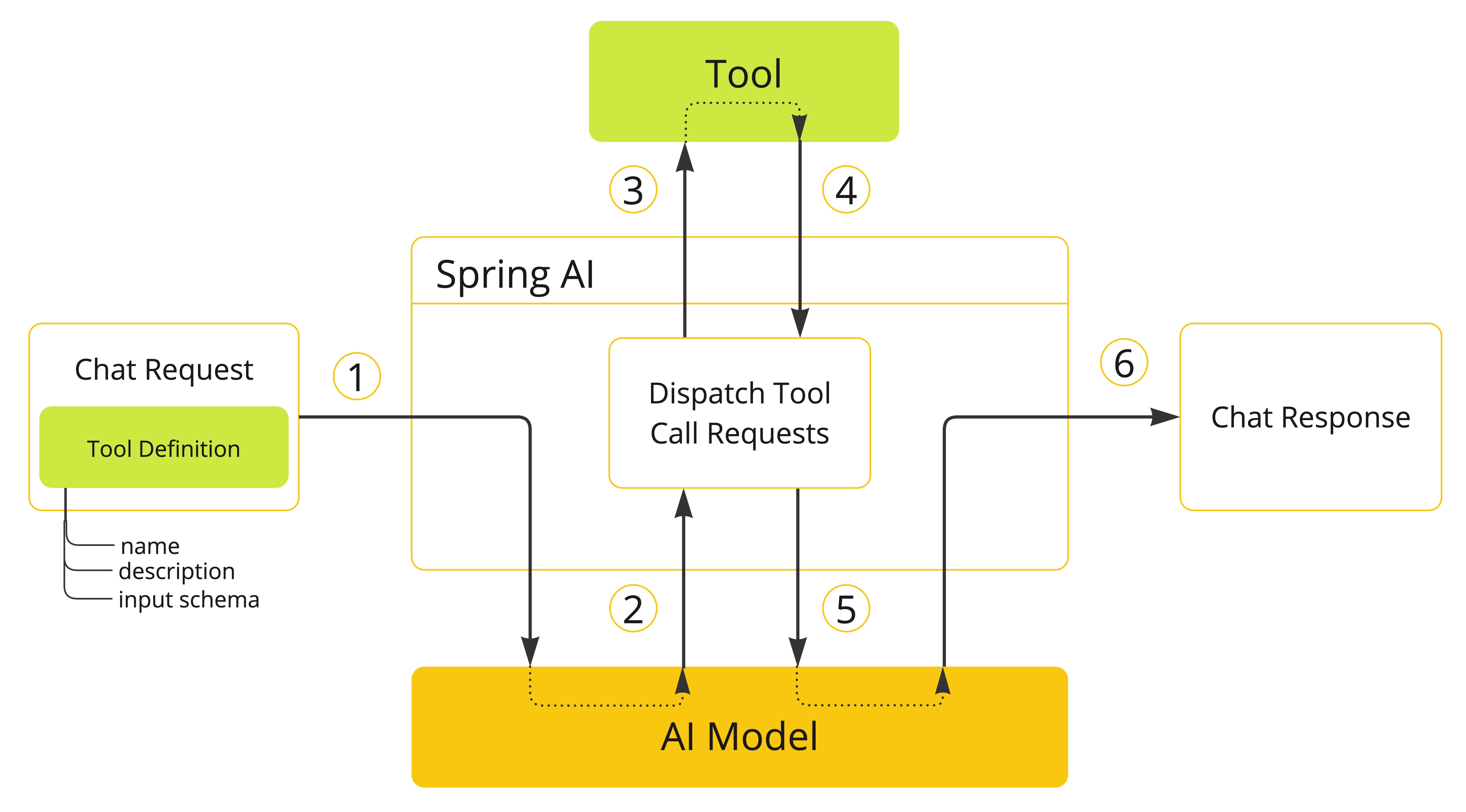
モデルでツールを使用できるようにするには、その定義をチャットリクエストに含めます。各ツール定義は、名前、説明、入力パラメーターのスキーマで構成されます。
モデルがツールを呼び出すことを決定すると、定義されたスキーマに従ってモデル化されたツール名と入力パラメーターを含むレスポンスが送信されます。
アプリケーションは、ツール名を使用して、提供された入力パラメーターでツールを識別し、実行する責任があります。
ツール呼び出しの結果はアプリケーションによって処理されます。
アプリケーションはツール呼び出しの結果をモデルに送り返します。
モデルは、ツール呼び出しの結果を追加のコンテキストとして使用して、最終レスポンスを生成します。
ツールはツール呼び出しの構成要素であり、ToolCallback インターフェースによってモデル化されます。Spring AI はメソッドと関数から ToolCallback を指定するための組み込みサポートを提供しますが、より多くのユースケースをサポートするために独自の ToolCallback 実装をいつでも定義できます。
ChatClient を使用する場合、ツール呼び出しリクエストは、アドバイザーチェーンに登録され、ToolCallingManager インターフェースを使用してツール実行ライフサイクル全体を管理している ToolCallingAdvisor によって自動的に処理されます。
ChatModel implementations previously handled tool execution internally. That approach is deprecated since 2.0.0 and will be removed in 3.0.0. Prefer using ChatClient with ToolCallingAdvisor instead. |
ChatClient と ChatModel はどちらも ToolCallback オブジェクトのリストを受け入れ、モデルと最終的に実行する ToolCallingManager でツールを使用できるようにします。
ToolCallback オブジェクトを直接渡すだけでなく、ToolCallbackResolver インターフェースを使用して動的に解決されるツール名のリストを渡すこともできます。
次のセクションでは、より多くのユースケースをサポートするためにカスタマイズおよび拡張する方法を含め、これらすべての概念と API についてさらに詳しく説明します。
ツールとしてのメソッド
Spring AI は、次の 2 つの方法でメソッドからツール (つまり ToolCallback (s)) を指定するための組み込みサポートを提供します。
@Toolアノテーションを使用して宣言的に低レベルの
MethodToolCallback実装を使用してプログラム的に実行します。
宣言的仕様: @Tool
@Tool でアノテーションを付けることで、メソッドをツールに変えることができます。
class DateTimeTools {

    @Tool(description = "Get the current date and time in the user's timezone")
    String getCurrentDateTime() {
        return LocalDateTime.now().atZone(LocaleContextHolder.getTimeZone().toZoneId()).toString();
    }

}
@Tool アノテーションを使用すると、ツールに関する重要な情報を提供できます。
name: ツールの名前。指定しない場合は、メソッド名が使用されます。AI モデルは、ツールを呼び出すときにこの名前を使用してツールを識別します。同じクラスに同じ名前のツールが 2 つあることは許可されません。名前は、特定のチャットリクエストに対してモデルで使用できるすべてのツールで一意である必要があります。description: ツールの説明。モデルはこれを使用して、ツールをいつどのように呼び出すかを理解できます。指定しない場合は、メソッド名がツールの説明として使用されます。ただし、モデルがツールの目的と使用方法を理解するには詳細な説明が最も重要であるため、詳細な説明を指定することを強くお勧めします。適切な説明を指定しないと、モデルがツールを必要なときに使用しなかったり、誤って使用したりする可能性があります。returnDirect: ツールの結果をクライアントに直接返すか、モデルに返すかを指定します。詳細については、直接 return を参照してください。resultConverter: ツール呼び出しの結果をString objectに変換して AI モデルに送り返すために使用するToolCallResultConverter実装。詳細については、結果変換を参照してください。
メソッドは静的またはインスタンスのいずれかであり、任意の可視性 (public、protected、package-private、private) を持つことができます。メソッドを含むクラスは、トップレベルクラスまたはネストされたクラスのいずれかであり、任意の可視性を持つことができます (インスタンス化を計画している場所からアクセスできる限り)。
Spring AI は、メソッドを含むクラスが Spring Bean (例: @Component) である限り、@Tool アノテーションが付けられたメソッドの AOT コンパイルの組み込みサポートを提供します。それ以外の場合は、GraalVM コンパイラーに必要な構成を提供する必要があります。例: クラスに @RegisterReflection(memberCategories = MemberCategory.INVOKE_DECLARED_METHODS) をアノテーションします。 |
メソッドには、ほとんどの型 (プリミティブ、POJO、列挙型、リスト、配列、マップなど) で任意の数の引数 (引数なしも含む) を定義できます。同様に、メソッドは、void を含むほとんどの型を返すことができます。メソッドが値を返す場合、結果は直列化されてモデルに送り返されるため、戻り値の型は直列化可能な型である必要があります。
| 一部の型はサポートされていません。詳細については、メソッドツールの制限を参照してください。 |
Spring AI は、@Tool アノテーション付きメソッドの入力パラメーターの JSON スキーマを自動的に生成します。モデルは、このスキーマを使用して、ツールの呼び出し方法とツールリクエストの準備方法を理解します。@ToolParam アノテーションを使用すると、入力パラメーターに関する追加情報 (説明、パラメーターが必須かオプションかなど) を提供できます。デフォルトでは、すべての入力パラメーターは必須と見なされます。
import java.time.LocalDateTime;
import java.time.format.DateTimeFormatter;
import org.springframework.ai.tool.annotation.Tool;
import org.springframework.ai.tool.annotation.ToolParam;

class DateTimeTools {

    @Tool(description = "Set a user alarm for the given time")
    void setAlarm(@ToolParam(description = "Time in ISO-8601 format") String time) {
        LocalDateTime alarmTime = LocalDateTime.parse(time, DateTimeFormatter.ISO_DATE_TIME);
        System.out.println("Alarm set for " + alarmTime);
    }

}
@ToolParam アノテーションを使用すると、ツールパラメーターに関する重要な情報を提供できます。
description: パラメーターの説明。モデルがパラメーターの使用方法をよりよく理解するために使用できます。例: パラメーターの形式、許可される値など。required: パラメーターが必須かオプションか。デフォルトでは、すべてのパラメーターが必須と見なされます。
パラメーターが @Nullable としてアノテーションされている場合、@ToolParam アノテーションを使用して明示的に必須としてマークされていない限り、オプションと見なされます。
@ToolParam アノテーションの他に、Swagger の @Schema アノテーションや Jackson の @JsonProperty アノテーションも使用できます。詳細については、JSON スキーマを参照してください。
ChatClient へのツールの追加
宣言型仕様アプローチを使用する場合、ChatClient を呼び出すときに、ツールクラスインスタンスを tools() メソッドに渡すことができます。このようなツールは、追加された特定のチャットリクエストに対してのみ使用できます。
ChatClient.create(chatModel)
    .prompt("What day is tomorrow?")
    .tools(new DateTimeTools())
    .call()
    .content();
Under the hood, the ChatClient will generate a ToolCallback from each @Tool -annotated method in the tool class instance and pass them to the model. In case you prefer to generate the ToolCallback (s) yourself, you can use the ToolCallbacks utility class and pass them directly to tools().
ToolCallback[] dateTimeTools = ToolCallbacks.from(new DateTimeTools());

ChatClient.create(chatModel)
    .prompt("What day is tomorrow?")
    .tools(dateTimeTools)
    .call()
    .content();
tools() also accepts ToolCallback and ToolCallbackProvider instances directly, alongside @Tool -annotated POJO instances and collections of any of these types.
ChatClient にデフォルトツールを追加する
宣言型仕様アプローチを使用する場合、ツールクラスインスタンスを defaultTools() メソッドに渡すことで、ChatClient.Builder にデフォルトツールを追加できます。デフォルトツールとランタイムツールの両方が提供されている場合、ランタイムツールはデフォルトツールを完全にオーバーライドします。
デフォルトのツールは、同じ ChatClient.Builder から構築されたすべての ChatClient インスタンスによって実行されるすべてのチャットリクエストで共有されます。これらは、さまざまなチャットリクエストでよく使用されるツールには便利ですが、慎重に使用しないと危険な場合もあり、使用すべきでないときに使用できるようになるリスクがあります。 |
ChatModel chatModel = ...
ChatClient chatClient = ChatClient.builder(chatModel)
    .defaultTools(new DateTimeTools())
    .build();
ChatModel へのツールの追加
宣言型仕様アプローチを使用する場合、ChatModel を呼び出すために使用する ToolCallingChatOptions の toolCallbacks() メソッドにツールクラスインスタンスを渡すことができます。このようなツールは、追加された特定のチャットリクエストでのみ使用できます。
ChatModel chatModel = ...
ToolCallback[] dateTimeTools = ToolCallbacks.from(new DateTimeTools());
ChatOptions chatOptions = ToolCallingChatOptions.builder()
    .toolCallbacks(dateTimeTools)
    .build();
Prompt prompt = new Prompt("What day is tomorrow?", chatOptions);
chatModel.call(prompt);
Calling ChatModel directly sends the tool definitions to the AI model, but tool calls in the response are not executed automatically. Use ChatClient (which auto-registers ToolCallingAdvisor) for automatic execution, or implement user-controlled tool execution to drive the loop yourself. |
ChatModel にデフォルトツールを追加する
宣言的仕様アプローチを使用する場合、ChatModel の作成に使用される ToolCallingChatOptions インスタンスの toolCallbacks() メソッドにツールクラスインスタンスを渡すことにより、構築時に ChatModel にデフォルトツールを追加できます。デフォルトツールとランタイムツールの両方が提供されている場合、ランタイムツールはデフォルトツールを完全にオーバーライドします。
デフォルトのツールは、その ChatModel インスタンスによって実行されるすべてのチャットリクエストで共有されます。これらは、さまざまなチャットリクエストでよく使用されるツールとして便利ですが、注意して使用しないと、使用すべきでないときに使用できるようになる危険性があり、危険でもあります。 |
ToolCallback[] dateTimeTools = ToolCallbacks.from(new DateTimeTools());
ChatModel chatModel = OllamaChatModel.builder()
    .ollamaApi(OllamaApi.builder().build())
    .options(ToolCallingChatOptions.builder()
            .toolCallbacks(dateTimeTools)
            .build())
    .build();
プログラム仕様: MethodToolCallback
MethodToolCallback をプログラムで構築することで、メソッドをツールに変えることができます。
class DateTimeTools {

    String getCurrentDateTime() {
        return LocalDateTime.now().atZone(LocaleContextHolder.getTimeZone().toZoneId()).toString();
    }

}
MethodToolCallback.Builder を使用すると、MethodToolCallback インスタンスを構築し、ツールに関する重要な情報を提供できます。
toolDefinition: ツール名、説明、入力スキーマを定義するToolDefinitionインスタンス。ToolDefinition.Builderクラスを使用して構築できます。必須。toolMetadata: 結果をクライアントに直接返すかどうか、使用する結果コンバーターなどの追加設定を定義するToolMetadataインスタンス。ToolMetadata.Builderクラスを使用して構築できます。toolMethod: ツールメソッドを表すMethodインスタンス。必須。toolObject: ツールメソッドを含むオブジェクトインスタンス。メソッドが静的である場合は、このパラメーターを省略できます。toolCallResultConverter: ツール呼び出しの結果をStringオブジェクトに変換して AI モデルに送り返すために使用するToolCallResultConverterインスタンス。指定しない場合は、デフォルトのコンバーター (DefaultToolCallResultConverter) が使用されます。
ToolDefinition.Builder を使用すると、ToolDefinition インスタンスを構築し、ツール名、説明、入力スキーマを定義できます。
name: ツールの名前。指定しない場合は、メソッド名が使用されます。AI モデルは、ツールを呼び出すときにこの名前を使用してツールを識別します。同じクラスに同じ名前のツールが 2 つあることは許可されません。名前は、特定のチャットリクエストに対してモデルで使用できるすべてのツールで一意である必要があります。description: ツールの説明。モデルはこれを使用して、ツールをいつどのように呼び出すかを理解できます。指定しない場合は、メソッド名がツールの説明として使用されます。ただし、モデルがツールの目的と使用方法を理解するには詳細な説明が最も重要であるため、詳細な説明を指定することを強くお勧めします。適切な説明を指定しないと、モデルがツールを必要なときに使用しなかったり、誤って使用したりする可能性があります。inputSchema: ツールの入力パラメーターの JSON スキーマ。指定しない場合は、メソッドパラメーターに基づいてスキーマが自動的に生成されます。@ToolParamアノテーションを使用して、入力パラメーターに関する追加情報 (説明、パラメーターが必須かオプションかなど) を提供できます。デフォルトでは、すべての入力パラメーターは必須と見なされます。詳細については、JSON スキーマを参照してください。
ToolMetadata.Builder を使用すると、ToolMetadata インスタンスを構築し、ツールの追加設定を定義できます。
returnDirect: ツールの結果をクライアントに直接返すか、モデルに返すかを指定します。詳細については、直接 return を参照してください。
Method method = ReflectionUtils.findMethod(DateTimeTools.class, "getCurrentDateTime");
ToolCallback toolCallback = MethodToolCallback.builder()
    .toolDefinition(ToolDefinitions.builder(method)
            .description("Get the current date and time in the user's timezone")
            .build())
    .toolMethod(method)
    .toolObject(new DateTimeTools())
    .build();
メソッドは静的またはインスタンスのいずれかであり、任意の可視性 (public、protected、package-private、private) を持つことができます。メソッドを含むクラスは、トップレベルクラスまたはネストされたクラスのいずれかであり、任意の可視性を持つことができます (インスタンス化を計画している場所からアクセスできる限り)。
Spring AI は、メソッドを含むクラスが Spring Bean (例: @Component) である限り、ツールメソッドの AOT コンパイルの組み込みサポートを提供します。それ以外の場合は、GraalVM コンパイラーに必要な構成を提供する必要があります。例: クラスに @RegisterReflection(memberCategories = MemberCategory.INVOKE_DECLARED_METHODS) をアノテーションします。 |
メソッドには、ほとんどの型 (プリミティブ、POJO、列挙型、リスト、配列、マップなど) で任意の数の引数 (引数なしも含む) を定義できます。同様に、メソッドは、void を含むほとんどの型を返すことができます。メソッドが値を返す場合、結果は直列化されてモデルに送り返されるため、戻り値の型は直列化可能な型である必要があります。
| 一部の型はサポートされていません。詳細については、メソッドツールの制限を参照してください。 |
メソッドが静的である場合、toolObject() メソッドは必要ないため省略できます。
class DateTimeTools {

    static String getCurrentDateTime() {
        return LocalDateTime.now().atZone(LocaleContextHolder.getTimeZone().toZoneId()).toString();
    }

}
Method method = ReflectionUtils.findMethod(DateTimeTools.class, "getCurrentDateTime");
ToolCallback toolCallback = MethodToolCallback.builder()
.toolDefinition(ToolDefinitions.builder(method)
.description("Get the current date and time in the user's timezone")
.build())
.toolMethod(method)
.build();Spring AI は、メソッドの入力パラメーターの JSON スキーマを自動的に生成します。モデルは、このスキーマを使用して、ツールの呼び出し方法とツールリクエストの準備方法を理解します。@ToolParam アノテーションを使用すると、入力パラメーターに関する追加情報 (説明、パラメーターが必須かオプションかなど) を提供できます。デフォルトでは、すべての入力パラメーターは必須と見なされます。
import java.time.LocalDateTime;
import java.time.format.DateTimeFormatter;
import org.springframework.ai.tool.annotation.ToolParam;

class DateTimeTools {

    void setAlarm(@ToolParam(description = "Time in ISO-8601 format") String time) {
        LocalDateTime alarmTime = LocalDateTime.parse(time, DateTimeFormatter.ISO_DATE_TIME);
        System.out.println("Alarm set for " + alarmTime);
    }

}
@ToolParam アノテーションを使用すると、ツールパラメーターに関する重要な情報を提供できます。
description: パラメーターの説明。モデルがパラメーターの使用方法をよりよく理解するために使用できます。例: パラメーターの形式、許可される値など。required: パラメーターが必須かオプションか。デフォルトでは、すべてのパラメーターが必須と見なされます。
パラメーターが @Nullable としてアノテーションされている場合、@ToolParam アノテーションを使用して明示的に必須としてマークされていない限り、オプションと見なされます。
@ToolParam アノテーションの他に、Swagger の @Schema アノテーションや Jackson の @JsonProperty アノテーションも使用できます。詳細については、JSON スキーマを参照してください。
ChatClient および ChatModel へのツールの追加
When using the programmatic specification approach, you can pass the MethodToolCallback instance directly to the tools() method on ChatClient. The tool will only be available for the specific chat request it’s added to.
ToolCallback toolCallback = ...
ChatClient.create(chatModel)
    .prompt("What day is tomorrow?")
    .tools(toolCallback)
    .call()
    .content();
ChatClient にデフォルトツールを追加する
When using the programmatic specification approach, you can add default tools to a ChatClient.Builder by passing the MethodToolCallback instance directly to defaultTools(). If both default and runtime tools are provided, the runtime tools will completely override the default tools.
デフォルトのツールは、同じ ChatClient.Builder から構築されたすべての ChatClient インスタンスによって実行されるすべてのチャットリクエストで共有されます。これらは、さまざまなチャットリクエストでよく使用されるツールには便利ですが、慎重に使用しないと危険な場合もあり、使用すべきでないときに使用できるようになるリスクがあります。 |
ChatModel chatModel = ...
ToolCallback toolCallback = ...
ChatClient chatClient = ChatClient.builder(chatModel)
    .defaultTools(toolCallback)
    .build();
ChatModel へのツールの追加
プログラムによる仕様アプローチを使用する場合、ChatModel を呼び出すために使用する ToolCallingChatOptions の toolCallbacks() メソッドに MethodToolCallback インスタンスを渡すことができます。このツールは、追加された特定のチャットリクエストに対してのみ使用できます。
ChatModel chatModel = ...
ToolCallback toolCallback = ...
ChatOptions chatOptions = ToolCallingChatOptions.builder()
    .toolCallbacks(toolCallback)
    .build();
Prompt prompt = new Prompt("What day is tomorrow?", chatOptions);
chatModel.call(prompt);
Calling ChatModel directly sends the tool definitions to the AI model, but tool calls in the response are not executed automatically. Use ChatClient (which auto-registers ToolCallingAdvisor) for automatic execution, or implement user-controlled tool execution to drive the loop yourself. |
ChatModel にデフォルトツールを追加する
プログラムによる仕様アプローチを使用する場合、ChatModel の作成に使用される ToolCallingChatOptions インスタンスの toolCallbacks() メソッドに MethodToolCallback インスタンスを渡すことにより、構築時に ChatModel にデフォルトツールを追加できます。デフォルトツールとランタイムツールの両方が提供されている場合、ランタイムツールはデフォルトツールを完全にオーバーライドします。
デフォルトのツールは、その ChatModel インスタンスによって実行されるすべてのチャットリクエストで共有されます。これらは、さまざまなチャットリクエストでよく使用されるツールとして便利ですが、注意して使用しないと、使用すべきでないときに使用できるようになる危険性があり、危険でもあります。 |
ToolCallback toolCallback = ...
ChatModel chatModel = OllamaChatModel.builder()
    .ollamaApi(OllamaApi.builder().build())
    .options(ToolCallingChatOptions.builder()
            .toolCallbacks(toolCallback)
            .build())
    .build();
メソッドツールの制限
次の型は、ツールとして使用されるメソッドのパラメーターまたは戻り値の型として現在サポートされていません。
Optional非同期型 (たとえば
CompletableFuture、Future)リアクティブ型 (例:
Flow、Mono、Flux)機能型(例:
Function、Supplier、Consumer)。
機能型は、機能ベースのツール仕様アプローチを使用してサポートされます。詳細については、ツールとしての機能を参照してください。
ツールとしての機能
Spring AI は、低レベルの FunctionToolCallback 実装を使用してプログラム的に、または実行時に解決される @Bean として動的に、関数からツールを指定するための組み込みサポートを提供します。
プログラム仕様: FunctionToolCallback
プログラムで FunctionToolCallback を構築することで、関数型 (Function、Supplier、Consumer または BiFunction) をツールに変換できます。
public class WeatherService implements Function<WeatherRequest, WeatherResponse> {
    public WeatherResponse apply(WeatherRequest request) {
        return new WeatherResponse(30.0, Unit.C);
    }
}

public enum Unit { C, F }
public record WeatherRequest(String location, Unit unit) {}
public record WeatherResponse(double temp, Unit unit) {}
FunctionToolCallback.Builder を使用すると、FunctionToolCallback インスタンスを構築し、ツールに関する重要な情報を提供できます。
name: ツールの名前。AI モデルは、ツールを呼び出すときにこの名前を使用してツールを識別します。同じコンテキストで同じ名前のツールを 2 つ使用することはできません。名前は、特定のチャットリクエストに対してモデルで使用できるすべてのツールで一意である必要があります。必須。toolFunction: ツールメソッド (Function、Supplier、ConsumerまたはBiFunction) を表す機能オブジェクト。必須。description: ツールの説明。モデルはこれを使用して、ツールをいつどのように呼び出すかを理解できます。指定しない場合は、メソッド名がツールの説明として使用されます。ただし、モデルがツールの目的と使用方法を理解するには詳細な説明が最も重要であるため、詳細な説明を指定することを強くお勧めします。適切な説明を指定しないと、モデルがツールを必要なときに使用しなかったり、誤って使用したりする可能性があります。inputType: 関数入力の型。必須。inputSchema: ツールの入力パラメーターの JSON スキーマ。指定しない場合は、inputTypeに基づいてスキーマが自動的に生成されます。@ToolParamアノテーションを使用して、入力パラメーターに関する追加情報 (説明、パラメーターが必須かオプションかなど) を指定できます。デフォルトでは、すべての入力パラメーターが必須とみなされます。詳細については、JSON スキーマを参照してください。toolMetadata: 結果をクライアントに直接返すかどうか、使用する結果コンバーターなどの追加設定を定義するToolMetadataインスタンス。ToolMetadata.Builderクラスを使用して構築できます。toolCallResultConverter: ツール呼び出しの結果をStringオブジェクトに変換して AI モデルに送り返すために使用するToolCallResultConverterインスタンス。指定しない場合は、デフォルトのコンバーター (DefaultToolCallResultConverter) が使用されます。
ToolMetadata.Builder を使用すると、ToolMetadata インスタンスを構築し、ツールの追加設定を定義できます。
returnDirect: ツールの結果をクライアントに直接返すか、モデルに返すかを指定します。詳細については、直接 return を参照してください。
ToolCallback toolCallback = FunctionToolCallback
    .builder("currentWeather", new WeatherService())
    .description("Get the weather in location")
    .inputType(WeatherRequest.class)
.build(); 関数の入力と出力は、Void または POJO のいずれかになります。結果は直列化されてモデルに送り返されるため、入力と出力の POJO は直列化可能である必要があります。関数と入力および出力の型はパブリックである必要があります。
| 一部の型はサポートされていません。詳細については、関数ツールの制限を参照してください。 |
ChatClient へのツールの追加
When using the programmatic specification approach, you can pass the FunctionToolCallback instance directly to the tools() method on ChatClient. The tool will only be available for the specific chat request it’s added to.
ToolCallback toolCallback = ...
ChatClient.create(chatModel)
    .prompt("What's the weather like in Copenhagen?")
    .tools(toolCallback)
    .call()
    .content();
ChatClient にデフォルトツールを追加する
When using the programmatic specification approach, you can add default tools to a ChatClient.Builder by passing the FunctionToolCallback instance directly to defaultTools(). If both default and runtime tools are provided, the runtime tools will completely override the default tools.
デフォルトのツールは、同じ ChatClient.Builder から構築されたすべての ChatClient インスタンスによって実行されるすべてのチャットリクエストで共有されます。これらは、さまざまなチャットリクエストでよく使用されるツールには便利ですが、慎重に使用しないと危険な場合もあり、使用すべきでないときに使用できるようになるリスクがあります。 |
ChatModel chatModel = ...
ToolCallback toolCallback = ...
ChatClient chatClient = ChatClient.builder(chatModel)
    .defaultTools(toolCallback)
    .build();
ChatModel へのツールの追加
プログラムによる仕様アプローチを使用する場合、FunctionToolCallback インスタンスを ToolCallingChatOptions の toolCallbacks() メソッドに渡すことができます。このツールは、追加された特定のチャットリクエストに対してのみ使用できます。
ChatModel chatModel = ...
ToolCallback toolCallback = ...
ChatOptions chatOptions = ToolCallingChatOptions.builder()
    .toolCallbacks(toolCallback)
    .build();
Prompt prompt = new Prompt("What's the weather like in Copenhagen?", chatOptions);
chatModel.call(prompt);
Calling ChatModel directly sends the tool definitions to the AI model, but tool calls in the response are not executed automatically. Use ChatClient (which auto-registers ToolCallingAdvisor) for automatic execution, or implement user-controlled tool execution to drive the loop yourself. |
ChatModel にデフォルトツールを追加する
プログラムによる仕様アプローチを使用する場合、ChatModel の作成に使用される ToolCallingChatOptions インスタンスの toolCallbacks() メソッドに FunctionToolCallback インスタンスを渡すことにより、構築時に ChatModel にデフォルトツールを追加できます。デフォルトツールとランタイムツールの両方が提供されている場合、ランタイムツールはデフォルトツールを完全にオーバーライドします。
デフォルトのツールは、その ChatModel インスタンスによって実行されるすべてのチャットリクエストで共有されます。これらは、さまざまなチャットリクエストでよく使用されるツールとして便利ですが、注意して使用しないと、使用すべきでないときに使用できるようになる危険性があり、危険でもあります。 |
ToolCallback toolCallback = ...
ChatModel chatModel = OllamaChatModel.builder()
    .ollamaApi(OllamaApi.builder().build())
    .options(ToolCallingChatOptions.builder()
            .toolCallbacks(toolCallback)
            .build())
    .build();
ToolCallback Beans
Spring AI can automatically discover ToolCallback beans defined in the application context and make them available for resolution by name. This allows you to define tools as Spring beans using FunctionToolCallback.builder() or MethodToolCallback.builder(), and inject them into chat requests explicitly.
@Configuration(proxyBeanMethods = false)
class WeatherTools {

    WeatherService weatherService = new WeatherService();

	@Bean
	ToolCallback currentWeather() {
		return FunctionToolCallback.builder("currentWeather", weatherService::getWeather)
			.description("Get the weather in location")
			.inputType(WeatherRequest.class)
			.build();
	}

}
When the ToolCallback bean is needed in a chat request, inject it directly:
@Autowired
ToolCallback currentWeather;

// Pass it to ChatClient at request time
ChatClient.create(chatModel)
    .prompt("What's the weather like in Copenhagen?")
    .tools(currentWeather)
    .call()
    .content();

// Or register as a default tool for all requests via the builder
ChatClient chatClient = ChatClient.builder(chatModel)
    .defaultTools(currentWeather)
    .build();
Calling ChatModel directly sends the tool definitions to the AI model, but tool calls in the response are not executed automatically. Use ChatClient (which auto-registers ToolCallingAdvisor) for automatic execution, or implement user-controlled tool execution to drive the loop yourself. |
関数ツールの制限
次の型は現在、ツールとして使用される関数の入力型または出力型としてサポートされていません。
基本タイプ
Optionalコレクション型 (例:
List、Map、Array、Set)非同期型 (たとえば
CompletableFuture、Future)リアクティブ型(例:
Flow、Mono、Flux)。
プリミティブ型とコレクションは、メソッドベースのツール仕様アプローチを使用してサポートされます。詳細については、ツールとしてのメソッドを参照してください。
ツール仕様
Spring AI では、ツールは ToolCallback インターフェースを介してモデル化されます。前のセクションでは、Spring AI によって提供される組み込みサポートを使用して、メソッドと関数からツールを定義する方法について説明しました ( ツールとしてのメソッドおよびツールとしての機能を参照)。このセクションでは、ツール仕様の詳細と、より多くのユースケースをサポートするためにツールをカスタマイズおよび拡張する方法について説明します。
ツールコールバック
ToolCallback インターフェースは、定義と実行ロジックの両方を含む、AI モデルから呼び出すことができるツールを定義する方法を提供します。これは、ツールを最初から定義する場合に実装する主要なインターフェースです。例: MCP クライアント (モデルコンテキストプロトコルを使用) または ChatClient (モジュラーエージェントアプリケーションを構築するため) から ToolCallback を定義できます。
インターフェースは次のメソッドを提供します。
public interface ToolCallback {

	/**
	 * Definition used by the AI model to determine when and how to call the tool.
	 */
	ToolDefinition getToolDefinition();

	/**
	 * Metadata providing additional information on how to handle the tool.
	 */
	ToolMetadata getToolMetadata();

    /**
	 * Execute tool with the given input and return the result to send back to the AI model.
	 */
	String call(String toolInput);

    /**
	 * Execute tool with the given input and context, and return the result to send back to the AI model.
	 */
	String call(String toolInput, ToolContext tooContext);

}
Spring AI は、ツールメソッド (MethodToolCallback) とツール関数 (FunctionToolCallback) の組み込み実装を提供します。
ツールの定義
ToolDefinition インターフェースは、ツール名、説明、入力スキーマなど、ツールの可用性について AI モデルが認識するために必要な情報を提供します。各 ToolCallback 実装では、ツールを定義するために ToolDefinition インスタンスを提供する必要があります。
インターフェースは次のメソッドを提供します。
public interface ToolDefinition {

	/**
	 * The tool name. Unique within the tool set provided to a model.
	 */
	String name();

	/**
	 * The tool description, used by the AI model to determine what the tool does.
	 */
	String description();

	/**
	 * The schema of the parameters used to call the tool.
	 */
	String inputSchema();

}| 入力スキーマの詳細については、JSON スキーマを参照してください。 |
ToolDefinition.Builder を使用すると、デフォルトの実装 (DefaultToolDefinition) を使用して ToolDefinition インスタンスを構築できます。
ToolDefinition toolDefinition = ToolDefinition.builder()
    .name("currentWeather")
    .description("Get the weather in location")
    .inputSchema("""
        {
            "type": "object",
            "properties": {
                "location": {
                    "type": "string"
                },
                "unit": {
                    "type": "string",
                    "enum": ["C", "F"]
                }
            },
            "required": ["location", "unit"]
        }
    """)
    .build();
方法ツールの定義
メソッドからツールを構築すると、ToolDefinition が自動的に生成されます。ToolDefinition を自分で生成したい場合は、この便利なビルダーを使用できます。
Method method = ReflectionUtils.findMethod(DateTimeTools.class, "getCurrentDateTime");
ToolDefinition toolDefinition = ToolDefinitions.from(method);
メソッドから生成された ToolDefinition には、ツール名としてのメソッド名、ツールの説明としてのメソッド名、メソッド入力パラメーターの JSON スキーマが含まれます。メソッドに @Tool のアノテーションが付けられている場合、ツール名と説明はアノテーションから取得されます (設定されている場合)。
| 詳細については、ツールとしてのメソッドを参照してください。 |
一部またはすべての属性を明示的に指定したい場合は、ToolDefinition.Builder を使用してカスタム ToolDefinition インスタンスを構築できます。
Method method = ReflectionUtils.findMethod(DateTimeTools.class, "getCurrentDateTime");
ToolDefinition toolDefinition = ToolDefinitions.builder(method)
    .name("currentDateTime")
    .description("Get the current date and time in the user's timezone")
    .inputSchema(JsonSchemaGenerator.generateForMethodInput(method))
    .build();
機能ツールの定義
関数からツールを構築すると、ToolDefinition が自動的に生成されます。FunctionToolCallback.Builder を使用して FunctionToolCallback インスタンスを構築する場合、ToolDefinition の生成に使用されるツール名、説明、入力スキーマを指定できます。詳細については、ツールとしての機能を参照してください。
JSON スキーマ
AI モデルにツールを提供する場合、モデルはツールを呼び出すための入力型のスキーマを認識する必要があります。スキーマは、ツールの呼び出し方法とツールリクエストの準備方法を理解するために使用されます。Spring AI は、JsonSchemaGenerator クラスを介してツールの入力型の JSON スキーマを生成するための組み込みサポートを提供します。スキーマは、ToolDefinition の一部として提供されます。
ToolDefinition の詳細と、それに入力スキーマを渡す方法については、ツールの定義を参照してください。 |
JsonSchemaGenerator クラスは、ツールとしてのメソッドおよびツールとしての機能で説明されているいずれかの戦略を使用して、メソッドまたは関数の入力パラメーターの JSON スキーマを生成するために内部的に使用されます。JSON スキーマ生成ロジックは、メソッドおよび関数の入力パラメーターで使用して結果のスキーマをカスタマイズできる一連のアノテーションをサポートしています。
このセクションでは、ツールの入力パラメーターの JSON スキーマを生成するときにカスタマイズできる 2 つの主なオプション (説明と必須ステータス) について説明します。
説明
ツール自体の説明を提供するだけでなく、ツールの入力パラメーターの説明も提供できます。説明は、パラメーターの形式や許可される値など、入力パラメーターに関する重要な情報を提供するために使用できます。これは、モデルが入力スキーマとその使用方法を理解できます。Spring AI は、次のいずれかのアノテーションを使用して入力パラメーターの説明を生成するための組み込みサポートを提供します。
Spring AI からの
@ToolParam(description = "…")Jackson からの
@JsonClassDescription(description = "…")Jackson からの
@JsonPropertyDescription(description = "…")Swagger の
@Schema(description = "…")。
このアプローチはメソッドと関数の両方に機能し、ネストされた型に対して再帰的に使用できます。
import java.time.LocalDateTime;
import java.time.format.DateTimeFormatter;
import org.springframework.ai.tool.annotation.Tool;
import org.springframework.ai.tool.annotation.ToolParam;
import org.springframework.context.i18n.LocaleContextHolder;

class DateTimeTools {

    @Tool(description = "Set a user alarm for the given time")
    void setAlarm(@ToolParam(description = "Time in ISO-8601 format") String time) {
        LocalDateTime alarmTime = LocalDateTime.parse(time, DateTimeFormatter.ISO_DATE_TIME);
        System.out.println("Alarm set for " + alarmTime);
    }

}
必須 / オプション
デフォルトでは、各入力パラメーターは必須とみなされ、ツールを呼び出す際に AI モデルが値を提供するよう強制されます。ただし、以下のいずれかのアノテーション(優先順位順)を使用することで、入力パラメーターをオプションにすることができます。
Spring AI からの
@ToolParam(required = false)Jackson からの
@JsonProperty(required = false)Swagger の
@Schema(required = false)Spring Framework から
@Nullable。
このアプローチはメソッドと関数の両方に機能し、ネストされた型に対して再帰的に使用できます。
class CustomerTools {

    @Tool(description = "Update customer information")
    void updateCustomerInfo(Long id, String name, @ToolParam(required = false) String email) {
        System.out.println("Updated info for customer with id: " + id);
    }

} 入力パラメーターの必須ステータスを正しく定義することは、幻覚のリスクを軽減し、ツールを呼び出す際にモデルが正しい入力を提供することを保証するために不可欠です。前の例では、email パラメーターはオプションであるため、モデルは値を指定せずにツールを呼び出すことができます。もしこのパラメーターが必須であれば、モデルはツールを呼び出す際に値を指定する必要があります。そして、値が存在しない場合は、モデルが勝手に値を作成し、幻覚を引き起こす可能性があります。 |
結果変換
ツール呼び出しの結果は ToolCallResultConverter を使用して直列化され、AI モデルに送り返されます。ToolCallResultConverter インターフェースは、ツール呼び出しの結果を String オブジェクトに変換する方法を提供します。
インターフェースは次のメソッドを提供します。
@FunctionalInterface
public interface ToolCallResultConverter {

	/**
	 * Given an Object returned by a tool, convert it to a String compatible with the
	 * given class type.
	 */
	String convert(@Nullable Object result, @Nullable Type returnType);

}
結果は直列化可能な型である必要があります。デフォルトでは、結果は Jackson (DefaultToolCallResultConverter) を使用して JSON に直列化されますが、独自の ToolCallResultConverter 実装を提供することで直列化プロセスをカスタマイズできます。
Spring AI は、メソッドと関数ツールの両方で ToolCallResultConverter に依存しています。
メソッドツール呼び出し結果変換
宣言的なアプローチを使用してメソッドからツールを構築する場合、@Tool アノテーションの resultConverter() 属性を設定することで、ツールに使用するカスタム ToolCallResultConverter を提供できます。
class CustomerTools {

    @Tool(description = "Retrieve customer information", resultConverter = CustomToolCallResultConverter.class)
    Customer getCustomerInfo(Long id) {
        return customerRepository.findById(id);
    }

} プログラムによるアプローチを使用する場合は、MethodToolCallback.Builder の resultConverter() 属性を設定することで、ツールに使用するカスタム ToolCallResultConverter を提供できます。
詳細については、ツールとしてのメソッドを参照してください。
関数ツール呼び出し結果変換
プログラムによるアプローチを使用して関数からツールを構築する場合、FunctionToolCallback.Builder の resultConverter() 属性を設定することで、ツールに使用するカスタム ToolCallResultConverter を提供できます。
詳細については、ツールとしての機能を参照してください。
ツールコンテキスト
Spring AI は、ToolContext API を介してツールに追加のコンテキスト情報を渡すことをサポートしています。この機能により、AI モデルから渡されるツール引数に加えて、ツール実行時に使用できるユーザー提供の追加データを提供できます。

class CustomerTools {

    @Tool(description = "Retrieve customer information")
    Customer getCustomerInfo(Long id, ToolContext toolContext) {
        return customerRepository.findById(id, toolContext.getContext().get("tenantId"));
    }

}
ToolContext には、ChatClient を呼び出すときにユーザーが提供するデータが入力されます。
ChatModel chatModel = ...

String response = ChatClient.create(chatModel)
        .prompt("Tell me more about the customer with ID 42")
        .tools(new CustomerTools())
        .toolContext(Map.of("tenantId", "acme"))
        .call()
        .content();

System.out.println(response);
ToolContext で提供されるデータは AI モデルに送信されません。 |
同様に、ChatModel を直接呼び出すときにツールコンテキストデータを定義できます。
ChatModel chatModel = ...
ToolCallback[] customerTools = ToolCallbacks.from(new CustomerTools());
ChatOptions chatOptions = ToolCallingChatOptions.builder()
    .toolCallbacks(customerTools)
    .toolContext(Map.of("tenantId", "acme"))
    .build();
Prompt prompt = new Prompt("Tell me more about the customer with ID 42", chatOptions);
chatModel.call(prompt);
toolContext オプションがデフォルトオプションとランタイムオプションの両方で設定されている場合、結果の ToolContext は 2 つのオプションをマージしたものになり、ランタイムオプションがデフォルトオプションよりも優先されます。
直接 return
デフォルトでは、ツール呼び出しの結果はレスポンスとしてモデルに返されます。その後、モデルはその結果を使用して会話を続行できます。
結果をモデルに返すのではなく、呼び出し元に直接返す方が望ましい場合があります。たとえば、RAG ツールに依存するエージェントを構築する場合、不要な後処理のためにモデルに結果を返すのではなく、呼び出し元に直接返す方が望ましい場合があります。あるいは、エージェントの推論ループを終了させる必要がある特定のツールがあるかもしれません。
各 ToolCallback 実装では、ツール呼び出しの結果を呼び出し元に直接返すか、モデルに送り返すかを定義できます。デフォルトでは、結果はモデルに送り返されますが、この動作はツールごとに変更できます。
ツール実行ライフサイクルの管理を担う ToolCallingManager は、ツールに関連付けられた returnDirect 属性の処理を担当します。この属性が true に設定されている場合、ツール呼び出しの結果は呼び出し元に直接返されます。それ以外の場合は、結果はモデルに返されます。
複数のツール呼び出しが一度にリクエストされた場合、すべてのツールが呼び出し元に直接結果を返すように、returnDirect 属性を true に設定する必要があります。そうでない場合、結果はモデルに返されます。 |

モデルでツールを使用できるようにするには、チャットリクエストにその定義を含めます。ツールの実行結果を呼び出し元に直接返したい場合は、
returnDirect属性をtrueに設定します。モデルがツールを呼び出すことを決定すると、定義されたスキーマに従ってモデル化されたツール名と入力パラメーターを含むレスポンスが送信されます。
アプリケーションは、ツール名を使用して、提供された入力パラメーターでツールを識別し、実行する責任があります。
ツール呼び出しの結果はアプリケーションによって処理されます。
アプリケーションは、ツール呼び出しの結果をモデルに送り返すのではなく、呼び出し元に直接送信します。
メソッドリターンダイレクト
宣言的なアプローチを使用してメソッドからツールを構築する場合、@Tool アノテーションの returnDirect 属性を true に設定することで、ツールが結果を呼び出し元に直接返すようにマークできます。
class CustomerTools {

    @Tool(description = "Retrieve customer information", returnDirect = true)
    Customer getCustomerInfo(Long id) {
        return customerRepository.findById(id);
    }

} プログラムによるアプローチを使用する場合は、ToolMetadata インターフェースを介して returnDirect 属性を設定し、それを MethodToolCallback.Builder に渡すことができます。
ToolMetadata toolMetadata = ToolMetadata.builder()
    .returnDirect(true)
.build();詳細については、ツールとしてのメソッドを参照してください。
関数戻り値直接
プログラムによるアプローチを使用して関数からツールを構築する場合、ToolMetadata インターフェースを介して returnDirect 属性を設定し、それを FunctionToolCallback.Builder に渡すことができます。
ToolMetadata toolMetadata = ToolMetadata.builder()
    .returnDirect(true)
.build();詳細については、ツールとしての機能を参照してください。
ツールの実行
ツール実行とは、指定された入力引数を用いてツールを呼び出し、結果を返すプロセスです。ツール実行は、ツール実行ライフサイクルの管理を担う ToolCallingManager インターフェースによって処理されます。
public interface ToolCallingManager {

	/**
	 * Resolve the tool definitions from the model's tool calling options.
	 */
	List<ToolDefinition> resolveToolDefinitions(ToolCallingChatOptions chatOptions);

	/**
	 * Execute the tool calls requested by the model.
	 */
	ToolExecutionResult executeToolCalls(Prompt prompt, ChatResponse chatResponse);

}
Spring AI Spring Boot Starter のいずれかをご利用の場合、DefaultToolCallingManager は ToolCallingManager インターフェースの自動構成実装です。独自の ToolCallingManager Bean を提供することで、ツールの実行動作をカスタマイズできます。
@Bean
ToolCallingManager toolCallingManager() {
    return ToolCallingManager.builder().build();
}
Spring AI supports three approaches to tool execution lifecycle management. The recommended approach is フレームワーク制御ツール実行 via ChatClient, which handles the tool calling loop automatically. For cases that require customizing the tool calling loop, Advisor-Controlled Tool Execution is available. When you need full manual control, a ユーザー制御ツールの実行 mode is also available.
フレームワーク制御ツール実行
When using ChatClient, Spring AI automatically handles the entire tool calling lifecycle through the ToolCallingAdvisor, which is auto-registered in the advisor chain whenever tools are configured. All of this is done transparently — you provide the tools and ask your question; the framework manages the rest.

When we want to make a tool available to the model, we include its definition in the chat request and invoke the
ChatClientAPI, which sends the request to the AI model.When the model decides to call a tool, it sends a response with the tool name and input parameters.
The
ToolCallingAdvisorin the advisor chain intercepts the response and sends the tool call request to theToolCallingManager.The
ToolCallingManageridentifies and executes the tool with the provided input parameters.The tool execution result is returned to the
ToolCallingManager.The
ToolCallingManagerreturns the result to theToolCallingAdvisor.The
ToolCallingAdvisorsends the tool execution result back to the AI model as aToolResponseMessage.The AI model generates the final response using the tool result as additional context and returns it to the caller via
ChatClient.
String response = ChatClient.create(chatModel)
    .prompt("What day is tomorrow?")
    .tools(new DateTimeTools())
    .call()
    .content();
To disable auto-registration globally for all calls from an auto-configured ChatClient, set the following property:
spring.ai.chat.client.tool-calling.enabled=falseTo disable it for a single call only:
chatClient.prompt("What day is tomorrow?")
    .tools(new DateTimeTools())
    .advisors(AdvisorParams.toolCallingAdvisorAutoRegister(false))
    .call()
    .content();
ToolCallingAdvisor によるアドバイザー制御ツール実行
For cases that require customizing the tool calling loop, you can configure ToolCallingAdvisor explicitly. ToolCallingAdvisor implements the tool calling loop as part of the advisor chain and exposes several extension points:
可観測性 : チェーンの他のアドバイザーは、各ツール呼び出しの反復をインターセプトして観測することができます。
チャットメモリとの連携 : チャットメモリアドバイザーとシームレスに連携し、会話履歴を管理します。
拡張性 : Custom
ToolExecutionEligibilityCheckerand hook methods allow fine-grained control over the loop
When the model requests a tool call, ToolCallingAdvisor executes the tool via ToolCallingManager and sends the result back to the model, looping until no more tool calls are needed.
var toolCallingAdvisor = ToolCallingAdvisor.builder()
    .toolCallingManager(toolCallingManager)
    .advisorOrder(BaseAdvisor.HIGHEST_PRECEDENCE + 300)
    .build();

var chatClient = ChatClient.builder(chatModel)
    .defaultAdvisors(toolCallingAdvisor)
    .build();

String response = chatClient.prompt("What day is tomorrow?")
    .tools(new DateTimeTools())
    .call()
    .content();
構成オプション
ToolCallingAdvisor.Builder は次の構成オプションをサポートしています。
toolCallingManager: ツール呼び出しを実行するために使用するToolCallingManagerインスタンス。指定されていない場合は、デフォルトのインスタンスが使用されます。advisorOrder: チェーンでアドバイザーが適用される順序。BaseAdvisor.HIGHEST_PRECEDENCEからBaseAdvisor.LOWEST_PRECEDENCEまでの範囲で指定する必要があります。conversationHistoryEnabled: ツール呼び出しの反復中にアドバイザーが会話履歴を内部的に保持するかどうかを制御します。デフォルトはtrueです。streamToolCallResponses: Whentrue, each tool-call iteration streams its chunks in real time during a.stream()call. Whenfalse(default), only the final answer is streamed.toolExecutionEligibilityChecker: AFunction<ChatResponse, Boolean>that decides whether a model response should trigger the next tool-call iteration. The default checkschatResponse.hasToolCalls(). Override this to apply provider-specific stop-reason logic (e.g. checking a finish reason field in addition to tool-call presence).
会話履歴管理
デフォルト設定(conversationHistoryEnabled=true)では、ToolCallingAdvisor はツール呼び出しの反復処理中に会話履歴全体を内部的に保持します。以降の LLM 呼び出しには、以前のすべてのメッセージが含まれます。
The default ordering keeps memory advisors outside the tool-call loop: DEFAULT_CHAT_MEMORY_PRECEDENCE_ORDER is HIGHEST_PRECEDENCE + 200, which is lower than ToolCallingAdvisor.DEFAULT_ORDER (HIGHEST_PRECEDENCE + 300). The memory advisor loads history once before the loop and persists only the final user/assistant exchange afterward. This works with all ChatMemoryRepository implementations because tool-call messages are never written to the repository.
// Default: memory advisor outside the tool-call loop; ToolCallingAdvisor manages intermediate history
var chatMemoryAdvisor = MessageChatMemoryAdvisor.builder(chatMemory).build();

var chatClient = ChatClient.builder(chatModel)
    .defaultAdvisors(chatMemoryAdvisor)
    .build();
Use .disableInternalConversationHistory() only when placing the memory advisor inside the loop (order above ToolCallingAdvisor.DEFAULT_ORDER). The memory advisor then handles history on every iteration. This requires a ChatMemoryRepository that supports tool-call messages (such as InMemoryChatMemoryRepository).
| The spring-ai-session [GitHub] (英語) community project provides a session-aware memory implementation that fully supports tool-call messages and can be safely used inside the tool-call loop with any backend. See the spring-ai-session documentation (英語) . |
var toolCallingAdvisor = ToolCallingAdvisor.builder()
    .toolCallingManager(toolCallingManager)
    .disableInternalConversationHistory()  // Memory advisor inside the loop handles history
    .advisorOrder(BaseAdvisor.HIGHEST_PRECEDENCE + 300)
    .build();

var chatMemoryAdvisor = MessageChatMemoryAdvisor.builder(chatMemory)
    .advisorOrder(BaseAdvisor.HIGHEST_PRECEDENCE + 400)  // Inside (after) ToolCallingAdvisor
    .build();

var chatClient = ChatClient.builder(chatModel)
    .defaultAdvisors(chatMemoryAdvisor, toolCallingAdvisor)
    .build();
直接 return
ToolCallingAdvisor は「直接返却」機能をサポートしており、ツールが LLM をバイパスして結果をクライアントに直接返すことができます。ツール実行時に returnDirect=true が指定されている場合、アドバイザーはツール呼び出しループを抜け出し、ツールの結果を直接返します。
ToolCallingAdvisor の詳細については、再帰アドバイザー - ToolCallingAdvisor を参照してください。
ユーザー制御ツールの実行
There are cases where you’d rather control the tool execution lifecycle yourself. To do so, invoke the ChatModel directly without adding ToolCallingAdvisor to the advisor chain.
It’s your responsibility to check for tool calls in the ChatResponse and execute them using the ToolCallingManager.
次の例は、ユーザー制御のツール実行アプローチの最小限の実装を示しています。
ChatModel chatModel = ...
ToolCallingManager toolCallingManager = ToolCallingManager.builder().build();

ChatOptions chatOptions = ToolCallingChatOptions.builder()
    .toolCallbacks(ToolCallbacks.from(new CustomerTools()))
    .build();
Prompt prompt = new Prompt("Tell me more about the customer with ID 42", chatOptions);

ChatResponse chatResponse = chatModel.call(prompt);

while (chatResponse.hasToolCalls()) {
    ToolExecutionResult toolExecutionResult = toolCallingManager.executeToolCalls(prompt, chatResponse);

    prompt = new Prompt(toolExecutionResult.conversationHistory(), chatOptions);

    chatResponse = chatModel.call(prompt);
}

System.out.println(chatResponse.getResult().getOutput().getText());
ユーザー制御によるツール実行アプローチを選択する場合は、ツール呼び出し操作の管理に ToolCallingManager を使用することをお勧めします。これにより、Spring AI が提供するツール実行のための組み込みサポートを活用できます。ただし、独自のツール実行ロジックを実装することも可能です。 |
The same pattern works with the streaming API. Because tool calls span multiple stream chunks, each streaming call must be aggregated first using MessageAggregator before checking for tool calls:
ChatModel chatModel = ...
ToolCallingManager toolCallingManager = ToolCallingManager.builder().build();

ChatOptions chatOptions = ToolCallingChatOptions.builder()
    .toolCallbacks(new CustomerTools())
    .build();
Prompt prompt = new Prompt("Tell me more about the customer with ID 42", chatOptions);

AtomicReference<ChatResponse> aggregatedResponseRef = new AtomicReference<>();
new MessageAggregator()
    .aggregate(chatModel.stream(prompt), aggregatedResponseRef::set)
    .collectList().block();

while (aggregatedResponseRef.get().hasToolCalls()) {
    ToolExecutionResult toolExecutionResult = toolCallingManager.executeToolCalls(prompt, aggregatedResponseRef.get());

    prompt = new Prompt(toolExecutionResult.conversationHistory(), chatOptions);

    aggregatedResponseRef.set(null);
    new MessageAggregator()
        .aggregate(chatModel.stream(prompt), aggregatedResponseRef::set)
        .collectList().block();
}

System.out.println(aggregatedResponseRef.get().getResult().getOutput().getText()); 次の例は、ChatMemory API の使用と組み合わせた、ユーザー制御のツール実行アプローチの最小限の実装を示しています。
ToolCallingManager toolCallingManager = DefaultToolCallingManager.builder().build();
ChatMemory chatMemory = MessageWindowChatMemory.builder().build();
String conversationId = UUID.randomUUID().toString();

ChatOptions chatOptions = ToolCallingChatOptions.builder()
    .toolCallbacks(ToolCallbacks.from(new MathTools()))
    .build();
Prompt prompt = new Prompt(
        List.of(new SystemMessage("You are a helpful assistant."), new UserMessage("What is 6 * 8?")),
        chatOptions);
chatMemory.add(conversationId, prompt.getInstructions());

Prompt promptWithMemory = new Prompt(chatMemory.get(conversationId), chatOptions);
ChatResponse chatResponse = chatModel.call(promptWithMemory);
chatMemory.add(conversationId, chatResponse.getResult().getOutput());

while (chatResponse.hasToolCalls()) {
    ToolExecutionResult toolExecutionResult = toolCallingManager.executeToolCalls(promptWithMemory,
            chatResponse);
    chatMemory.add(conversationId, toolExecutionResult.conversationHistory()
        .get(toolExecutionResult.conversationHistory().size() - 1));
    promptWithMemory = new Prompt(chatMemory.get(conversationId), chatOptions);
    chatResponse = chatModel.call(promptWithMemory);
    chatMemory.add(conversationId, chatResponse.getResult().getOutput());
}

UserMessage newUserMessage = new UserMessage("What did I ask you earlier?");
chatMemory.add(conversationId, newUserMessage);

ChatResponse newResponse = chatModel.call(new Prompt(chatMemory.get(conversationId)));
例外処理
ツール呼び出しが失敗すると、例外は ToolExecutionException として伝播され、これをキャッチすることでエラーを処理できます。ToolExecutionExceptionProcessor は ToolExecutionException の処理に使用でき、その処理結果は 2 種類あります。AI モデルに返されるエラーメッセージを生成するか、呼び出し元で処理される例外をスローするかのいずれかです。
@FunctionalInterface
public interface ToolExecutionExceptionProcessor {

	/**
	 * Convert an exception thrown by a tool to a String that can be sent back to the AI
	 * model or throw an exception to be handled by the caller.
	 */
	String process(ToolExecutionException exception);

}
Spring AI Spring Boot Starter のいずれかを使用している場合、DefaultToolExecutionExceptionProcessor は ToolExecutionExceptionProcessor インターフェースの自動構成された実装です。デフォルトでは、RuntimeException のエラーメッセージがモデルに返され、チェック例外とエラー(例: IOException、OutOfMemoryError)は常にスローされます。DefaultToolExecutionExceptionProcessor コンストラクターを使用すると、alwaysThrow 属性を true または false に設定できます。true の場合は、モデルにエラーメッセージが返される代わりに例外がスローされます。
`spring.ai.tools.throw-exception-on-error プロパティを使用して、DefaultToolExecutionExceptionProcessor Bean の動作を制御できます。
| プロパティ | 説明 | デフォルト |
|---|---|---|
|
|
|
@Bean
ToolExecutionExceptionProcessor toolExecutionExceptionProcessor() {
    return new DefaultToolExecutionExceptionProcessor(true);
}
独自の ToolCallback 実装を定義した場合は、call() メソッドのツール実行ロジックの一部としてエラーが発生したときに、必ず ToolExecutionException をスローするようにしてください。 |
ToolExecutionExceptionProcessor は、ツール実行中の例外を処理するために、デフォルトの ToolCallingManager (DefaultToolCallingManager)によって内部的に使用されます。ツール実行ライフサイクルの詳細については、ツールの実行を参照してください。
ツール解決
モデルにツールを渡す主なメソッドは、ツールとしてのメソッドおよびツールとしての機能で説明されている戦略のいずれかを使用して、ChatClient または ChatModel を呼び出すときに ToolCallback を提供することです。
ただし、Spring AI は、ToolCallbackResolver インターフェースを使用して実行時にツールを動的に解決することもサポートします。
public interface ToolCallbackResolver {

	/**
	 * Resolve the {@link ToolCallback} for the given tool name.
	 */
	@Nullable
	ToolCallback resolve(String toolName);

}
When using this approach, a ToolCallbackResolver implementation is responsible for resolving the tool names to the corresponding ToolCallback instances.
By default, Spring AI relies on a StaticToolCallbackResolver that resolves tools from a static list of ToolCallback instances. When using the Spring Boot Autoconfiguration, this resolver is automatically configured with all the beans of type ToolCallback defined in the application context.
Spring Boot 自動構成に依存している場合は、カスタム ToolCallbackResolver Bean を提供することで解決ロジックをカスタマイズできます。
@Bean
ToolCallbackResolver toolCallbackResolver(List<ToolCallback> toolCallbacks) {
    return new StaticToolCallbackResolver(toolCallbacks);
}
ToolCallbackResolver は、実行時にツールを動的に解決するために ToolCallingManager によって内部的に使用され、ToolCallingAdvisor によるアドバイザー制御ツール実行とユーザー制御ツールの実行の両方をサポートします。
ツール引数の拡張
Spring AI は、ツール入力スキーマに引数を追加することで動的に拡張できるユーティリティを提供します。これにより、基盤となるツール実装を変更することなく、推論やメタデータなどのモデルから追加情報を取得できます。
一般的な使用例としては、以下のようなものがあります。
イントロスペクト的思考/推論 : ツールを実行する前に、モデルの段階的な推論をキャプチャーする
記憶力向上 : 抽出した知見を長期記憶に保存する
分析と追跡 : メタデータ、ユーザーの意図、使用パターンを収集する
マルチエージェント協調 : エージェント識別子または調整シグナルを渡す
クイックスタート
Java レコードとしての拡張引数を定義する :
public record AgentThinking(
    @ToolParam(description = "Your reasoning for calling this tool", required = true)
    String innerThought,

    @ToolParam(description = "Confidence level (low, medium, high)", required = false)
    String confidence
) {} ツールを包むと AugmentedToolCallbackProvider:
AugmentedToolCallbackProvider<AgentThinking> provider = AugmentedToolCallbackProvider
    .<AgentThinking>builder()
    .toolObject(new MyTools())  // Your @Tool annotated class
    .argumentType(AgentThinking.class)
    .argumentConsumer(event -> {
        AgentThinking thinking = event.arguments();
        log.info("Tool: {} | Reasoning: {}", event.toolDefinition().name(), thinking.innerThought());
    })
    .removeExtraArgumentsAfterProcessing(true)
    .build();
ChatClient と併用してください :
ChatClient chatClient = ChatClient.builder(chatModel)
    .defaultTools(provider)
    .build();
LLM は、追加フィールドを含む拡張スキーマを認識します。コンシューマーは AgentThinking レコードを受け取りますが、元のツールは想定される引数のみを受け取ります。
可観測性
ツール呼び出しには、完了時間を測定しトレース情報を伝播する spring.ai.tool の観測による可観測性サポートが含まれます。ツール呼び出しの可観測性を参照してください。
オプションで、Spring AI はツール呼び出し引数と結果をスパン属性としてエクスポートできますが、機密性上の理由からデフォルトでは無効になっています。詳細: ツール呼び出し引数と結果データ。
ツール検索ツール
As AI agents connect to more services (Slack, GitHub, Jira, MCP servers), tool libraries grow rapidly. A typical multi-server setup can easily have 50+ tools consuming 55,000+ トークン before any conversation starts. Tool selection accuracy also degrades when models face 30+ similarly-named tools.
The ツール検索ツール pattern solves this by enabling on-demand tool discovery:
The model receives only a single search tool initially — minimal token usage.
When capabilities are needed, the model calls the search tool with a natural-language query.
Matching tool definitions are dynamically expanded into the context.
The model can then invoke the discovered tools normally.
This achieves significant token savings while maintaining access to large tool catalogs.
使い方
The ToolSearchToolCallingAdvisor extends Spring AI’s ToolCallingAdvisor to implement dynamic tool discovery.
The flow at runtime is:
インデックス作成 — At conversation start, all registered tools are indexed in the
ToolIndexbut not sent to the LLM.初回リクエスト — Only the built-in
toolSearchTooldefinition is sent to the LLM.ディスカバリコール — When the LLM needs a capability, it calls
toolSearchToolwith a search query.検索と展開 — The
ToolIndexfinds matching tools; their definitions are added to the next request.ツール呼び出し — The LLM sees both
toolSearchTooland the discovered tool definitions, and can call the actual tool.ツールの実行 — The discovered tool is executed and its result returned to the LLM.
レスポンス — The LLM generates the final answer using the tool result.
インストール
<dependency>
    <groupId>org.springframework.ai</groupId>
    <artifactId>spring-ai-tool-search-advisor</artifactId>
</dependency>
クイックスタート
// 1. Configure a ToolIndex (e.g., VectorToolIndex for semantic search)
@Bean
ToolIndex toolIndex(VectorStore vectorStore) {
    return new VectorToolIndex(vectorStore);
}

// 2. Create the advisor
var smartToolRetrieverAdvisor = ToolSearchToolCallingAdvisor.builder()
    .toolIndex(toolIndex)
    .maxResults(5)
    .build();

// 3. Use with ChatClient — tools are registered but NOT sent to the LLM initially
ChatClient chatClient = ChatClient.builder(chatModel)
    .defaultTools(new MyTools())
    .defaultAdvisors(smartToolRetrieverAdvisor)
    .build();

// 4. Make requests — tools are discovered on-demand
String answer = chatClient.prompt("What's the weather in Amsterdam?")
    .call()
    .content();
検索戦略
The ToolIndex interface abstracts the search implementation. Three strategies are provided out of the box:
| 戦略 | 実装 | 最適な用途 |
|---|---|---|
セマンティック |
| Natural-language queries, fuzzy matching |
キーワード |
| 正確な用語一致、既知のツール名 |
正規表現 |
| ツール名のパターン ( |
VectorToolIndex (セマンティック)
@Bean
ToolIndex vectorToolIndex(VectorStore vectorStore) {
    return new VectorToolIndex(vectorStore);
}
Uses embedding-based similarity search. Best for natural-language queries where users describe what they need.
構成
The following options are available on ToolSearchToolCallingAdvisor.Builder:
| オプション | 説明 | デフォルト |
|---|---|---|
| The search implementation to use. | 必須 |
| Maximum tool references returned per search. When |
|
| Custom prompt suffix appended to the system message to instruct the model how to use | Built-in template |
| When |
|
| Context key used to look up the conversation/session ID. Change this when your app stores the conversation ID under a custom key. |
|
| Determines when session tool indexes are freed. See Index Eviction below. |
|
| Position of this advisor in the advisor chain. |
|
ToolIndex API
The ToolIndex interface and its companion types (ToolSearchRequest、ToolSearchResponse、ToolReference) live in the spring-ai-tool-search-tool module under the package org.springframework.ai.tool.toolsearch. The built-in index implementations (LuceneToolIndex、VectorToolIndex、RegexToolIndex) are also provided in this module.
<dependency>
    <groupId>org.springframework.ai</groupId>
    <artifactId>spring-ai-tool-search-tool</artifactId>
</dependency>
public interface ToolIndex {
void indexTool(String sessionId, ToolReference toolReference);
void indexTools(String sessionId, List<ToolReference> toolReferences); // default: loops over indexTool
ToolSearchResponse search(ToolSearchRequest request);
void clearIndex(String sessionId);
}Each call is scoped by sessionId so tool indexes are isolated across concurrent conversations.
Index Eviction
By default (LruEvictionStrategy(1000)), up to 1,000 active sessions are retained and the least-recently-used session is evicted when the cap is exceeded. Call advisor.evictSession(sessionId) to release a session eagerly (e.g. on logout). Five built-in strategies are provided:
| 戦略 | 振る舞い |
|---|---|
|
Evicts the least-recently-used session once the number of active sessions exceeds |
| Never evicts automatically; indexes persist until |
| Clears a session’s index before every request, forcing a full re-index each turn. Useful for testing or when tool sets change every request. |
| Evicts sessions whose last-access time exceeds the given TTL. Evaluated lazily on each request. |
| Delegates to multiple strategies and evicts a session if any delegate requests it. |
// Default: LRU cap of 1000 sessions (no configuration needed)
var advisor = ToolSearchToolCallingAdvisor.builder()
    .toolIndex(toolIndex)
    .build();

// Never evict — manage session lifetime yourself
ToolIndexEvictionStrategy eviction = NeverEvictStrategy.INSTANCE;

// Always evict — re-index every request (useful for testing)
ToolIndexEvictionStrategy eviction = AlwaysEvictStrategy.INSTANCE;

// Evict least-recently-used session when more than 200 are active
ToolIndexEvictionStrategy eviction = new LruEvictionStrategy(200);

// Evict sessions idle for more than 30 minutes
ToolIndexEvictionStrategy eviction = new TtlEvictionStrategy(Duration.ofMinutes(30));

// Combine: TTL + LRU cap
ToolIndexEvictionStrategy eviction = new CompositeEvictionStrategy(
    new TtlEvictionStrategy(Duration.ofMinutes(30)),
    new LruEvictionStrategy(200));

var advisor = ToolSearchToolCallingAdvisor.builder()
    .toolIndex(toolIndex)
    .evictionStrategy(eviction)
    .build();
Eviction is evaluated lazily on each request — no background thread is required.
いつ使うか
Good fit:
10 or more tools in your system.
Tool definitions are consuming more than 10K tokens.
Building MCP-powered systems with multiple servers.
Experiencing tool selection accuracy issues with large tool sets.
Traditional approach may be better:
Small tool library (fewer than 10 tools).
All tools are frequently used in every session.
Tool definitions are very compact.

